Crossref Manager is the DOI interface built into OJS 3.5: it shows the registration status of each submission, deposits DOIs automatically on publication, allows bulk deposits and re-deposits metadata when you update an article. If your journal already has DOIs, this is the screen worth checking for every issue.
Before you read: if you are interested in the overall state of your identifiers, our piece on broken metadata and missing DOIs diagnoses the problem; this entry explains the tool you use to operate inside OJS.
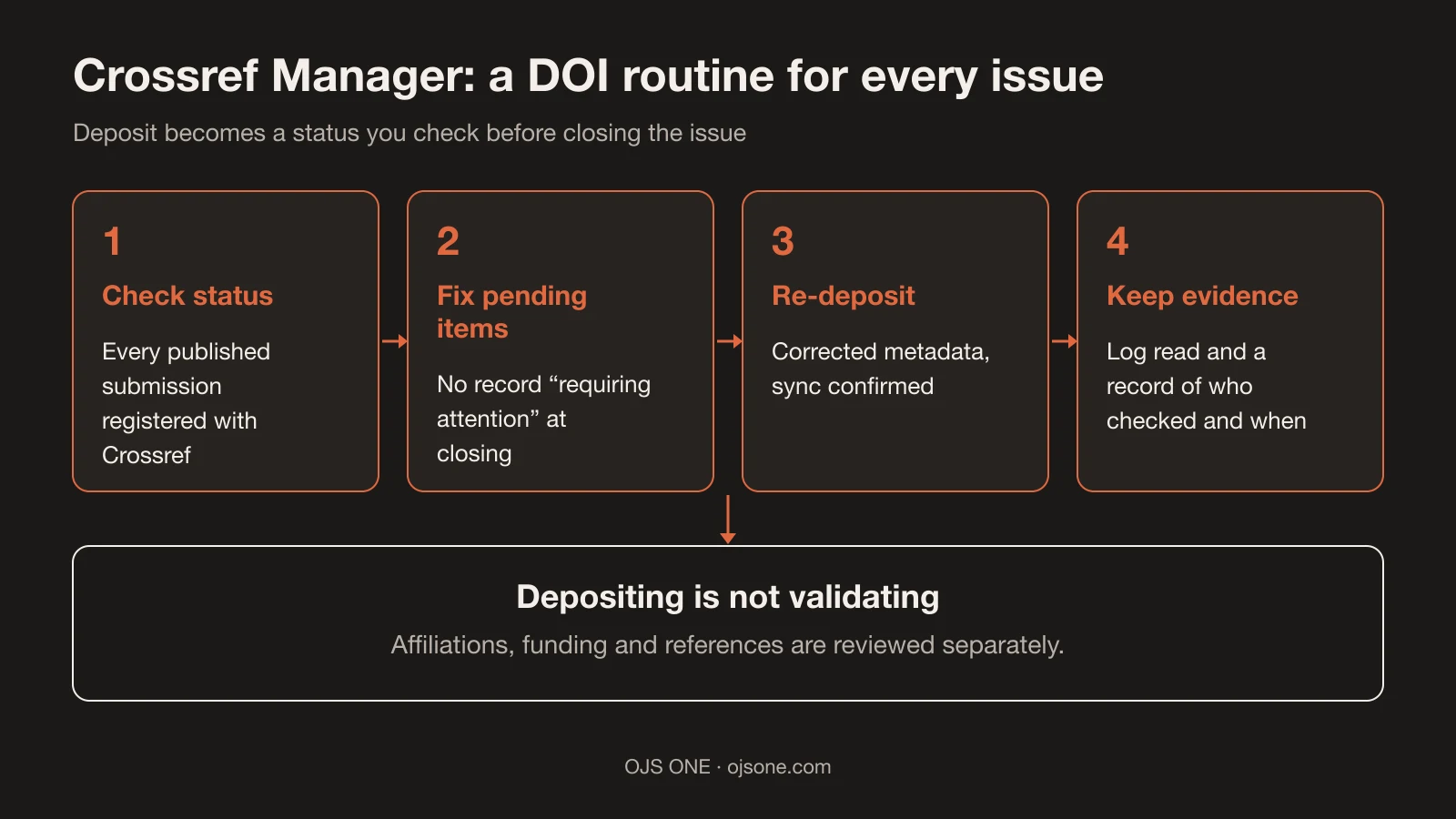
What Crossref Manager does in OJS 3.5
Direct answer: it registers, monitors and deposits DOIs and metadata in Crossref from the platform itself, without leaving OJS.
PKP and Crossref described it like this on 16 November 2026: "The Crossref Manager in OJS 3.5 streamlines how journals register, monitor, and deposit DOIs and rich metadata directly to Crossref"1. Broken down into concrete functions:
- Visible registration status: navigation lets you "see the registration status of every submission easily"1, that is, check submission by submission whether the DOI was registered.
- Automatic deposit: "automatic depositing of DOIs as soon as an article is published"1, with no manual step per issue.
- Bulk deposits: actions on several DOIs at once ("bulk actions like depositing multiple article DOIs at the same time"1).
- Re-deposit: when you correct metadata in OJS, you can "push or re-deposit updated article metadata to Crossref"1.
- Sync check: "Status tracking lets you see whether items have been properly synced with Crossref's API"1.
PKP adds that the redesigned interface "helps journal teams monitor registration status, identify records requiring attention, and manage DOI activities more efficiently"1, and that 3.5 integrates ORCID into the core and ROR for affiliations1, which is useful if you want to verify affiliations as we show in the guide to checking ROR in Crossref.
What you need to use it
Direct answer: Crossref membership and a DOI prefix, plus configuring the plugin according to your OJS version.
Crossref puts it bluntly: "you need to set up your OJS (Open Journal Systems) platform to create DOIs on your Crossref DOI prefix"2. Configuration changes by version ("a different way depending on whether you are using OJS 3.5, 3.4, or OJS 3.3"2), so the first task is to confirm which version your journal runs before touching anything.
On versions, PKP's public recommendation is conservative: for installations that do not want to upgrade often, "we recommend only using LTS versions"3, and 3.5 is listed as LTS with support until "Q2 2029 (3 years)"3. If your portal is on 3.3 or 3.4, the upgrade path to 3.5 LTS is the natural prior step. And if your journal has been issuing DOIs for years, also check that the configured suffix still matches existing records: a change of pattern affects published identifiers and the citations that point to them.
How to check deposit status for every issue
Direct answer: with a short verification routine per issue, based on the manager's status and Crossref's reports.
Recommended routine (our own editorial criterion, adapted to what the documentation lets you check):
- Before closing the issue, review the registration status of each published submission in Crossref Manager. Any record "requiring attention" is fixed before the issue is considered closed1.
- Verify the deposit with the tools Crossref documents for checking registration ("Verify your registration") and for reading submissions ("Interpret submission logs"2).
- If you corrected metadata after publication, trigger the re-deposit and confirm that the status returns to synced1.
- Record who verified and when: DOI status is part of the issue's closing evidence, not a personal task for someone on the team.
With healthy DOIs, the next links in the chain work better: harvesting by services such as OpenAlex (how to check it in OpenAlex and OJS journals) and detecting metadata debt, which we cover in the piece linked above.
What changes compared with manual deposit
Direct answer: deposit stops being a separate task and becomes a status you look at, not a form you fill in.
Crossref still documents the "Web deposit form" as a registration route2, and in manual practice the cycle was: publish, prepare the metadata, send it and trust that nothing failed. The failure was discovered later, when someone checked the DOI in a browser. With Crossref Manager the cycle is reversed: the deposit is triggered on publication, the status is visible per submission and sync with Crossref's API is checked without leaving OJS1.
The change is not only speed: it is traceability. A "requiring attention" status visible on closing day is a few minutes' task; the same status discovered three weeks later, with the issue already circulating, is an editor's query and a public correction. That is why the routine above happens before closing, not after.
There is a metadata front worth checking at the same time: funding. In September 2026 Crossref began matching "funder names deposited in Crossref metadata without an identifier, to ROR IDs"1, so well-declared funding gains context in the scholarly network and poorly declared funding remains free text. If you want to check how your affiliations look today, the guide to checking ROR in Crossref is still the practical complement.
Common mistakes with DOI deposits
- Publishing and assuming the deposit happened, without checking the status: the article is visible in the journal but the Crossref record may be pending or failed.
- Correcting metadata in OJS and not re-depositing: the platform is up to date, Crossref keeps the previous version.
- Working without a sync check: there are registration statuses designed for that; ignoring them is deciding blind1.
- Mixing tasks: Crossref Manager handles DOIs and deposit metadata; it does not handle editorial policies, preservation or indexing (those need separate criteria and processes).
- Changing prefix or suffix configuration without a plan: Crossref documents how to build and maintain DOIs2; a badly made change affects identifiers already published.
DOI checklist before publishing the issue
- Each published submission with its registration status reviewed and no records "requiring attention"1.
- Metadata changes with re-deposit triggered and sync confirmed1.
- Prefix and suffix reviewed: the DOI shown by the journal matches the one Crossref registers2.
- Submission log read for the issue's period ("Interpret submission logs"2).
- Record of who verified and when, kept with the rest of the issue's closing evidence.
What Crossref Manager does NOT tell you
Direct answer: it does not tell you whether your journal is ready for an index or how many citations it will get.
The tool shows the technical status of registration and deposit. Evaluation by DOAJ, Latindex or SciELO depends on each index and its own criteria; a registered DOI does not, by itself, bring an application closer. Nor does it replace a review of the metadata's content: the deposit automates sending, it does not validate that affiliation, funding or references are correctly declared. And it does not solve the rest of the journal's operation: speed, backups and editorial email are separate fronts. If you want a diagnosis of your journal's editorial and interoperability state, that is part of the OJS 360 Assessment.
Frequently asked questions
Is Crossref Manager available in every OJS version?
No. The interface described corresponds to OJS 3.5; deposit configuration "is a different way depending on whether you are using OJS 3.5, 3.4, or OJS 3.3"2. In earlier versions the DOI workflow exists, but not with this interface.
Does automatic deposit replace checking DOIs?
No. It automates sending on publication and lets you see the status of each submission; reviewing the status and fixing problem records remain the journal's responsibility1.
Does it improve my position in search engines?
We do not promise that and neither does PKP: what the tool improves is the registration and sync of your DOIs with Crossref, the basis for other services to use that metadata1.
Conclusion. Having DOI status in view changes how an issue is closed: fewer surprises and a possible fix when registration fails. If you want us to review how your journal's deposit looks today (or move your portal to a version with this interface), the OJS 360 Assessment starts there; you can also write to us directly.
Sources
- PKP and Crossref. Visibility, commitment, compliance, and trust: How updated OJS installations help journals succeed. https://pkp.sfu.ca/2026/11/16/visibility-commitment-compliance-and-trust-how-updated-ojs-installations-help-journals-succeed/ (accessed 18 November 2026).
- Crossref. OJS platform. https://www.crossref.org/documentation/register-maintain-records/ojs-plugin/ (accessed 18 November 2026).
- PKP. PKP Software Releases. https://pkp.sfu.ca/software/releases (accessed 18 November 2026).
OJS 360 Assessment
Before applying, know exactly what is missing
We review metadata, DOIs, OAI-PMH, policies and preservation against what DOAJ, Latindex and SciELO ask for, and hand you a prioritized route with owners.
- Evidence-based diagnosis by dimension
- Prioritized route and correction plan
- Indexing decisions always belong to the index
OJS 360 Assessment
Before applying, know exactly what is missing
We review metadata, DOIs, OAI-PMH, policies and preservation against what DOAJ, Latindex and SciELO ask for, and hand you a prioritized route with owners.
Request a diagnosis