A ROR appearing in an article's Crossref record does not show that your journal deposited it. To check ROR affiliations in Crossref you need to tell three states apart: absence, presence and accuracy. This guide shows how to query a single DOI and a whole journal by ISSN with the public API, how to read the Participation Report and what each finding means.
It promises neither indexing nor better rankings. It is an inspection procedure over public data, meant to decide what to fix in the metadata deposit.
What ROR is and why it appears in Crossref metadata
ROR (Research Organization Registry) is an open registry of persistent identifiers for research organizations.1 A ROR identifies the institution behind a piece of research, so affiliations become machine-readable and connectable instead of free text that has to be matched by eye.1
Crossref states that ROR identifiers belong to the affiliation metadata deposited with it, both for authors and for funding recipients.1 That is why the ROR travels with the rest of the metadata: any tool that retrieves metadata from Crossref returns it when present.1
Before reviewing records, fix the scope. The check answers two different questions: is the ROR in the record? and is it the right ROR for that institution? The first is settled with the API and the reports; the second requires comparing against the official ROR registry and, when in doubt, against the institution itself.
How to query the ROR of a DOI in the Crossref API
The Crossref REST API is public and needs no registration or key to query metadata.2 Its base is https://api.crossref.org/ and it exposes several entry points.2
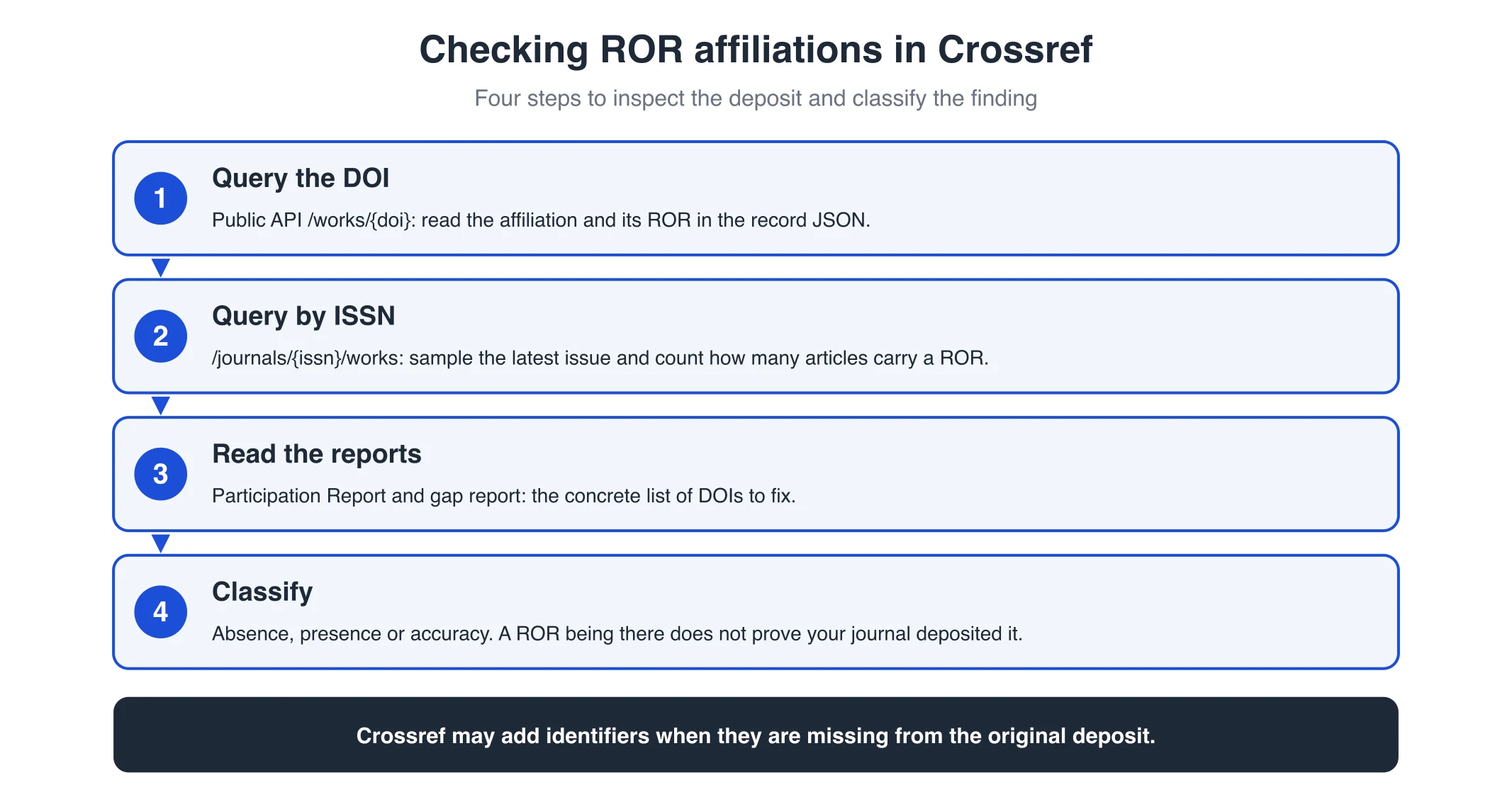
To read the record of one DOI, use the /works/{doi} endpoint. The documentation gives this example:
https://api.crossref.org/works/doi/10.1128/mbio.01735-252
The result is JSON. Inside each author, the affiliation block may carry a name field with the institution's name and, when it exists, a field with the ROR identifier (a https://ror.org/... URL). That identifier is what you are looking for.
What to note for each DOI reviewed:
- Does the article have an affiliation in the record?
- Does the affiliation carry a ROR?
- Does the ROR match the institution the author declares?
- Does every author with an affiliation carry it, or only some?
Do not review raw JSON by hand for full issues: automate it or work on a sample.
How to review the whole journal by ISSN
If you want to see the coverage of an entire title, Crossref exposes the /journals/{issn}/works endpoint, which lists the works registered under that ISSN.2 The documentation shows it with this example:
https://api.crossref.org/journals/03064530/works2
With that list you can sample recent articles and check how many carry a ROR. It complements the Participation Report: the API lets you see record by record, while the report gives you the aggregate percentage.
A useful criterion: take the latest published issue and review every article. If none carries a ROR, the problem is probably in the deposit, not in a single article. If you also find missing or malformed DOIs, our guide on broken metadata and missing DOIs sorts out that debt.
Checking ROR affiliations in Crossref: absence, presence and accuracy
Separating these three states prevents hasty conclusions.
Absence. The record carries no ROR in the affiliation. This is what you will see in journals that do not export that data. In OJS 3.5 it is possible to send affiliation to Crossref, which PKP describes as the key improvement of that version.4 It was not natively available before, so absence says more about the version and configuration than about editorial neglect.
Presence. The record carries a ROR. Here is the trap: Crossref clarifies that, in some cases, it adds identifiers when they are missing from the original deposit.2 In other words, seeing a ROR in Crossref is not proof that your journal sent it. Presence and your own deposit are not the same thing.
Accuracy. The ROR present points to the right organization. A wrongly assigned ROR is worse than none, because it durably connects the article to the wrong institution. The API is not enough here: open the record in ROR and compare name, country and website against the declared institution.
A useful review ends in a table per article: DOI, author, declared affiliation, ROR found, whether it is correct and who is responsible for the fix.
How to read the Participation Report and the gap report
Crossref keeps a Participation Report for each member, showing the percentage of its records that include eleven metadata elements, ROR among them.3 The ROR indicator measures the percentage of records with at least one ROR, for example in contributor metadata.3
To read it:
- Open Participation Reports and look up your organization in Find a Crossref Member.3
- Look at the ROR IDs indicator and its percentage.
- Filter by content type (journal articles) and by period.
- Break down by journal title by typing its name; only journals with an ISSN can be selected.3
The same report lets you download a gap report: a CSV with the DOIs of the records that lack the field you care about.3 It is the concrete work list, not a percentage. Use it to plan an update redeposit.
Keep in mind that changes in the report can take up to 24 hours to appear after you register or update metadata.3
Where the ROR comes from: journal deposit or Crossref addition
To find out whether the ROR comes from your own workflow, check two things: which OJS version you use and how the deposit is configured.
In OJS 3.5 affiliation can be sent to Crossref, and PKP presents it as a new capability of that version.4 When a publisher includes ROR in its metadata, Crossref can carry that institutional connection forward.4
Crossref also documents a ROR plugin for OJS, which lets authors add the ROR of the organization they are affiliated with.5 That plugin is the way to capture the identifier at submission, in versions where it is available.
If you deposit through a service provider or a form instead of XML, Crossref suggests asking them whether they already add ROR for you.1 It is a quick check that saves guessing.
The practical conclusion: before attributing a ROR to your own deposit, confirm that your workflow generates it. If not, the identifier may be arriving by another route.
Common mistakes when checking ROR affiliations
- Confusing presence with deposit. Crossref may add the identifier if it is missing from the original deposit.2
- Reviewing only the report percentage and not the gap report. The percentage does not tell you which DOIs to fix; the CSV does.3
- Checking only the visible article page. Showing the link or the name does not confirm the identifier reached the structured deposit field.
- Accepting the first ROR in the search. A wrongly assigned ROR connects the article to the wrong institution; compare against the official registry.
- Ignoring the OJS version. In versions before 3.5 affiliation export was not natively available, which changes the diagnosis.4
- Assuming ROR identifies the person. ROR identifies organizations; ORCID identifies people. They are different checks.
Frequently asked questions
Can I say my journal deposited the ROR just because it appears in Crossref?
No. Crossref clarifies that, in some cases, it adds identifiers when they are missing from the original deposit.2 To confirm, check whether your OJS workflow or your provider generates that data.
Do I need a key or to pay to query the Crossref API?
No. The REST API is public and needs no registration to query metadata.2 Use the base https://api.crossref.org/ with the /works/{doi} and /journals/{issn}/works endpoints.
Where do I get the exact list of DOIs missing a ROR?
In the Participation Report, by downloading the gap report: a CSV with the DOIs of the records missing the selected field.3
Conclusion. Checking ROR affiliations in Crossref is a reproducible procedure: query by DOI, sample by ISSN, read the Participation Report and distinguish absence, presence and accuracy. The goal is not to accumulate identifiers but for each ROR to match the author's real institution. If you would rather have a technical review sort this out together with the rest of your metadata, OJS ONE offers the OJS 360 Assessment diagnosis, quoted according to scope.
Sources
- Crossref. Research Organization Registry (ROR). https://www.crossref.org/documentation/ror (accessed 3 November 2026).
- Crossref. REST API. https://www.crossref.org/documentation/retrieve-metadata/rest-api (accessed 3 November 2026).
- Crossref. Participation Reports. https://www.crossref.org/documentation/reports/participation-reports/ (accessed 3 November 2026).
- PKP. From article to ecosystem with PKP and Crossref. https://pkp.sfu.ca/2026/07/13/updated-ojs-3-5-installation-supports-trusted-metadata/ (accessed 3 November 2026).
- Crossref. OJS platform. https://www.crossref.org/documentation/register-maintain-records/ojs-plugin/ (accessed 3 November 2026).
OJS 360 Assessment
Before applying, know exactly what is missing
We review metadata, DOIs, OAI-PMH, policies and preservation against what DOAJ, Latindex and SciELO ask for, and hand you a prioritized route with owners.
- Evidence-based diagnosis by dimension
- Prioritized route and correction plan
- Indexing decisions always belong to the index
OJS 360 Assessment
Before applying, know exactly what is missing
We review metadata, DOIs, OAI-PMH, policies and preservation against what DOAJ, Latindex and SciELO ask for, and hand you a prioritized route with owners.
Request a diagnosis