
ORCID in OJS 3.5: What Changes When It Joins the Core
Review ORCID in OJS 3.5: built-in features, credentials, permissions and tests without reinstalling the old plugin or altering records.
ORCID in OJS 3.5: What Changes When It Joins the Core
ORCID in OJS 3.5 works from the platform's core: PKP states that the old plugin is no longer needed and will not be updated for that version or later ones.[1] If you are preparing an upgrade, review the integration's configuration and tests; do not look for another download of the same add-on.
The change of location is not the same as permission to write to author records. This guide separates PKP's notice from the decisions your institution must make about credentials, permissions and checking that it works.
What changes for ORCID in OJS 3.5
The feature moves into the core; ORCID is not announced as going away. The official orcidProfile repository explicitly distinguishes the built-in features from the add-on that stops receiving updates for these versions.[1]
That is why an old instruction that starts by installing that plugin may not apply to your platform. Before following it, identify which version it refers to and which feature it intends to configure. A manual preserved on the internet does not demonstrate compatibility with your installation.
PKP also describes an ORCID tab in Users & Roles for member organizations, from which authorized users can enable data exchange with contributors' profiles.[2] Do not infer from that description that any editorial account has access, that an institution already holds credentials or that every exchange is enabled.
As an implementation criterion, record the change in your inventory: platform version, component that provides the feature and applicable documentation. If you hire support, ask for the evaluation to include the existing integration; do not accept as the only evidence that the plugin no longer appears in a list.
Authenticating an iD, displaying it and updating a record are different things
First define what you need to do. Displaying an identifier on an article, collecting it through authentication and adding a publication to an ORCID record do not represent the same outcome.
ORCID describes an editorial workflow in which the editor collects the authenticated iD, requests permission to interact with the record and keeps that permission. It then distinguishes including the identifier in the metadata from actions on the person's record.[3]
If your goal is to associate the right iD with an author, check the authentication path. Copying an identifier from another document does not show that its holder has connected it to that journal. ORCID's tutorial explains that authentication is done through its authorization flow and can rely on the Public API or the Member API.[6]
If the goal includes writing information, the scope changes. ORCID notes that member organizations can request update permissions through the Member API.[6] That capability depends on conditions and on the person's authorization, not only on the software including a feature.
We recommend that the project scope use verifiable verbs: collect, display, read or update. The expression "ORCID integrated" is insufficient if nobody specifies which of those actions was tested.
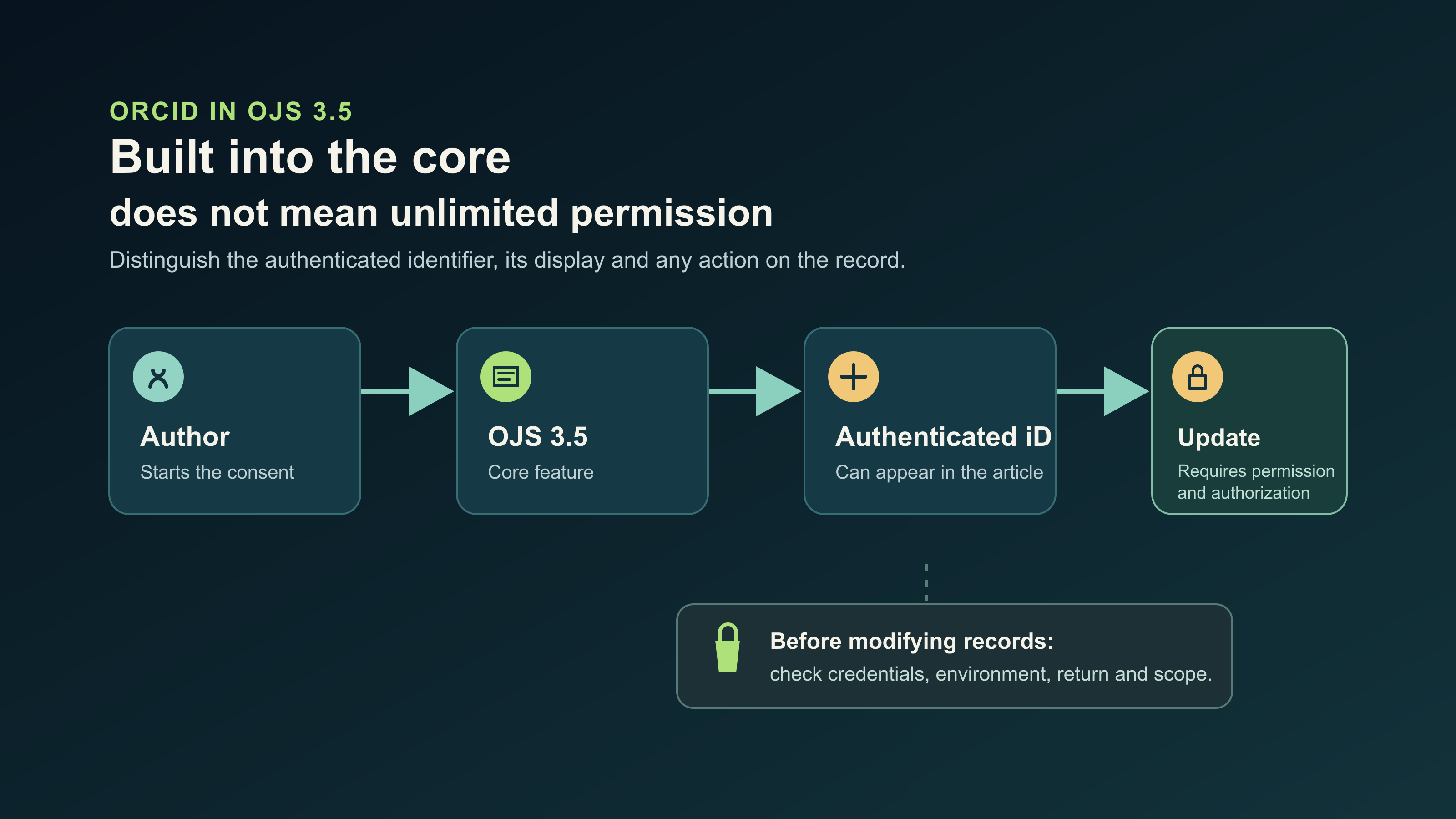
The diagram distinguishes the authenticated iD from any update to an ORCID record.
What to inventory before changing the ORCID configuration
Gather the current state before modifying it. The inventory should let you understand how the journal works and how to return to a known configuration if a test fails.
As a diagnostic baseline, we recommend recording:
- The exact OJS version and the documentation used for that version.
- Whether the feature is used for user profiles, article contributors or both.
- Which organization is responsible for the integration and who authorizes its changes.
- Which API mode and environment are configured, without copying keys into the report.
- Which domain the journal uses and which return path is expected after authentication.
- Which actions are enabled and what result was observed before the upgrade.
- How backups, access and test logs are protected.
This inventory is a control recommendation, not a list of requirements imposed by PKP. Its value lies in preventing a functional review from ending up as an improvised modification of accounts or data.
If the installation hosts several journals, identify which are included in the test. A satisfactory check on one of them is not sufficient evidence for the whole portal. Also record the exceptions and the integrations left outside the agreed scope.
Credentials, environment and permissions: what the technical owner should check
The owner should compare the credentials against the intended use. ORCID's documentation indicates that production Member API credentials are reserved for member organizations, while Sandbox test credentials can be requested without that condition.[4]
Do not confuse that possibility of testing with a production enablement. Nor should you assume that existing credentials are suitable for any service. ORCID establishes that public credentials are linked to a person's record and are not transferred to another; in addition, their terms of use must be reviewed before choosing that mode.[5]
For a university, make clear who maintains the institutional relationship, who keeps custody of the secrets and who can request a change. Do not use an editor's personal account as the default administrative solution without evaluating its implications.
Check the redirect address
An integration can fail even if the client identifier is correct. ORCID requires that redirect addresses be registered and that the domains match, including subdomains; its documentation accepts only HTTPS for production.[5]
If you changed the journal's domain, review that dependency as part of the project. Do not replace addresses blindly or delete the previous ones without checking which other flows use them.
As a recommended security measure, do not include the Client Secret, tokens or user credentials in screenshots, public tickets or training material. The acceptance report can state where they are kept and who is responsible, without revealing their content.
A controlled test before declaring the integration operational
The test should walk through the feature the institution needs, not stop at saving a configuration form. ORCID recommends trying the Public API in Sandbox before using production.[5] Its tutorial explains that the test environment lets you develop the integration without affecting the real record's data.[6]
We recommend agreeing on a sequence like this, adapted to the installation:
- Prepare an authorized environment and a test identity suited to the service used.
- Identify the point from which the connection starts and the owner who observes the test.
- Go through the sign-in and review which permission the application requests.
- Confirm that the user returns to the expected place and that the platform keeps the correct identifier.
- Check how the iD is displayed in the intended context, without publishing fictitious articles in production.
- Try what happens when the person does not authorize and document the result.
- If the scope includes writing, verify it only with appropriate permissions and credentials in the agreed environment.
Hypothetical example: a journal finishes its upgrade and sees the historical identifiers on the public page. Even so, a new connection does not return correctly from ORCID. The visible content and the authentication flow have different results; it is not appropriate to declare the integration complete until the second check is resolved.
To document acceptance, note the feature, environment, expected result, obtained result, evidence without secrets and owner of the pending item. Keep separate the observations that require technical configuration from the procedural questions that training can resolve.
The OJS upgrade guide helps place this work within the change project. The training guide for editors and managers covers practice by role; it does not replace the technical review of the credentials.
Common mistakes when adapting the integration
The most direct mistake is trying to recover the feature by reinstalling the old plugin. PKP's notice indicates that it is not needed and will not be updated for OJS 3.5 and later.[1] The specific action on an installation must be planned with its backups and dependencies, not from a generic removal instruction.
Another mistake is confusing a visible iD with verified authentication. The review should relate each result to the corresponding authorization flow, instead of assuming that the presence of a link shows the complete process.[3][6]
It is also worth avoiding these practices:
- Claiming that permissions or authorizations migrated without testing the necessary scope.
- Changing credentials as a first attempt at a fix, without keeping the earlier diagnosis.
- Using screenshots of the real environment to teach a course, exposing authors' data or secrets.
- Running a write test on real records without consent and institutional authorization.
- Considering the whole portal approved on the basis of a single screen or a single journal.
These precautions are recommended criteria for technical work. They do not describe a verified failure of your journal or presuppose that the upgrade lost information. If you find a problem, record the symptom before attributing a cause to it.
Frequently asked questions
Do I have to install the old ORCID plugin in OJS 3.5?
No. PKP reports that the ORCID features are built into the core and that the old plugin will not be updated for OJS 3.5 or later.[1] Review the configuration that corresponds to your installation instead of following instructions for earlier versions.
Does ORCID being built in allow updating any author record?
No. ORCID distinguishes authentication of the identifier from permissions to interact with the record.[3] Writing through the Member API requires the applicable institutional mode and authorization; building a feature into OJS does not replace those conditions.[4][6]
Are visible identifiers enough to approve an upgrade?
Not as the only criterion. We recommend checking the flow you need: connection, return, retention of the iD and, if it falls within the scope, authorized actions. Document the results without exposing credentials or making unauthorized changes to real records.
Review ORCID within the scope of your OJS operation
The practical conclusion is to separate the change confirmed by PKP from your journal's particular configuration. The old plugin stops being the component to install for this feature, but the institution still needs to define responsibilities and test its integration.[1]
If you need to review ORCID within an upgrade or the technical administration of the portal, see the OJS ONE operation service. Indicate version, number of journals and the features you need to check. The diagnosis should define the tests and their limits before intervening on the platform or on people's records.
Sources
- PKP, notice in the ORCID Profile Plugin repository — accessed 2026-10-22.
- PKP, What's New in OJS 3.5? Explore Enhanced Features — accessed 2026-10-22.
- ORCID, Journal Articles — accessed 2026-10-22.
- ORCID, Registering a Member API Client — accessed 2026-10-22.
- ORCID, Registering a Public API client — accessed 2026-10-22.
- ORCID, API Tutorial: Get an Authenticated ORCID iD — accessed 2026-10-22.
Is your journal struggling with slow performance or recurrent outages?
Contact our team and see how enterprise-grade infrastructure can transform your editorial operation.
Request assessment