Two OJS branches are approaching their end of support, and both point to the same quarter. OJS 3.3 end of support is not a vague concern: it is a date in PKP's official table, and the 3.4 branch reaches the same point. If your journal runs on either of them, here you will find what PKP says today, the open discrepancy between its pages and how to plan the move to 3.5 LTS without improvising.
What PKP says today about OJS 3.3 and 3.4
The short answer: both branches are still supported, and both end their support in the second quarter of 2027.
PKP's release table, checked on 16 November 2026, shows this row for 3.3: "3.3 LTS ✔ Supported 2021-02-02 Q2 2027 (6 years)"1, and this one for 3.4: "3.4 STS ✔ Supported 2023-06-09 Q2 2027 (3.5 years)"1. Version 3.5, the current LTS, is listed with end of life in the second quarter of 20291.
While a version is "Supported", PKP defines its scope like this: "We continue to provide bug fixes and security patches"1. In other words: bug fixes and security patches, no new features.
A nuance that is often missed: being on a supported branch does not mean having the update applied. PKP released 3.3.0-24 and 3.4.0-12 on 1 November 20262, and its security memo insists on the same point: "If you're on OJS 3.3 LTS, you should update to the latest release"3. The useful question for your journal is twofold: which version am I on, and which exact build is installed?
OJS 3.3 end of support: what it means for your journal
After end of support, the branch stops receiving changes: PKP's page says it plainly, "The code will receive no further updates"1. And on the risk of staying there, PKP's warning is direct: "Sooner or later, unsupported versions will develop security vulnerabilities"1.
What is cut off in practice:
- Core security patches. A CVE published after EOL will have no official fix for your branch.
- Forum assistance. PKP states that "Unsupported versions won't receive development updates, forum assistance from PKP staff"1.
- Documentation and translations. They follow the same schedule as the software1.
- Plugin and theme ecosystem. Third-party maintenance concentrates on live branches; on an unsupported branch, compatibility stops being anyone's commitment.
For an indexed journal, the problem is not cosmetic: it is continuity. An incident on an unpatched installation exposes the platform, the manuscripts under review and the trust of the indexes that depend on its availability. It is the same criterion we apply when reviewing what to ask of a provider after a security patch (see the PHP2Shell checklist).
The discrepancy between PKP's two sources
There is an open difference between PKP's official pages, and it is worth knowing before setting dates.
The release table says Q2 2027 for 3.31. The download page, for the same branch, says: "The latest LTS package was released on November 1st, 2026 and will be supported until at least January 1, 2027"2.
How to read that difference, in our view: "at least" is a floor, not a promise of extension. Do not plan the migration assuming support will be extended beyond January 2027, nor that it will end exactly on that day. The safe planning date is the table's Q2 2027, and any doubt should be confirmed with PKP through the official channel before committing to a maintenance window.
In practice: record in the minutes the date on which the table was checked ("accessed 16-11-2026") and open it again on the day the project is scheduled. If the date changes, the plan changes; if it does not, you have a record of when the decision was taken and with which source. A support date is not updated by a forum comment: it is updated by the official page.
What to review before upgrading (or before standing still)
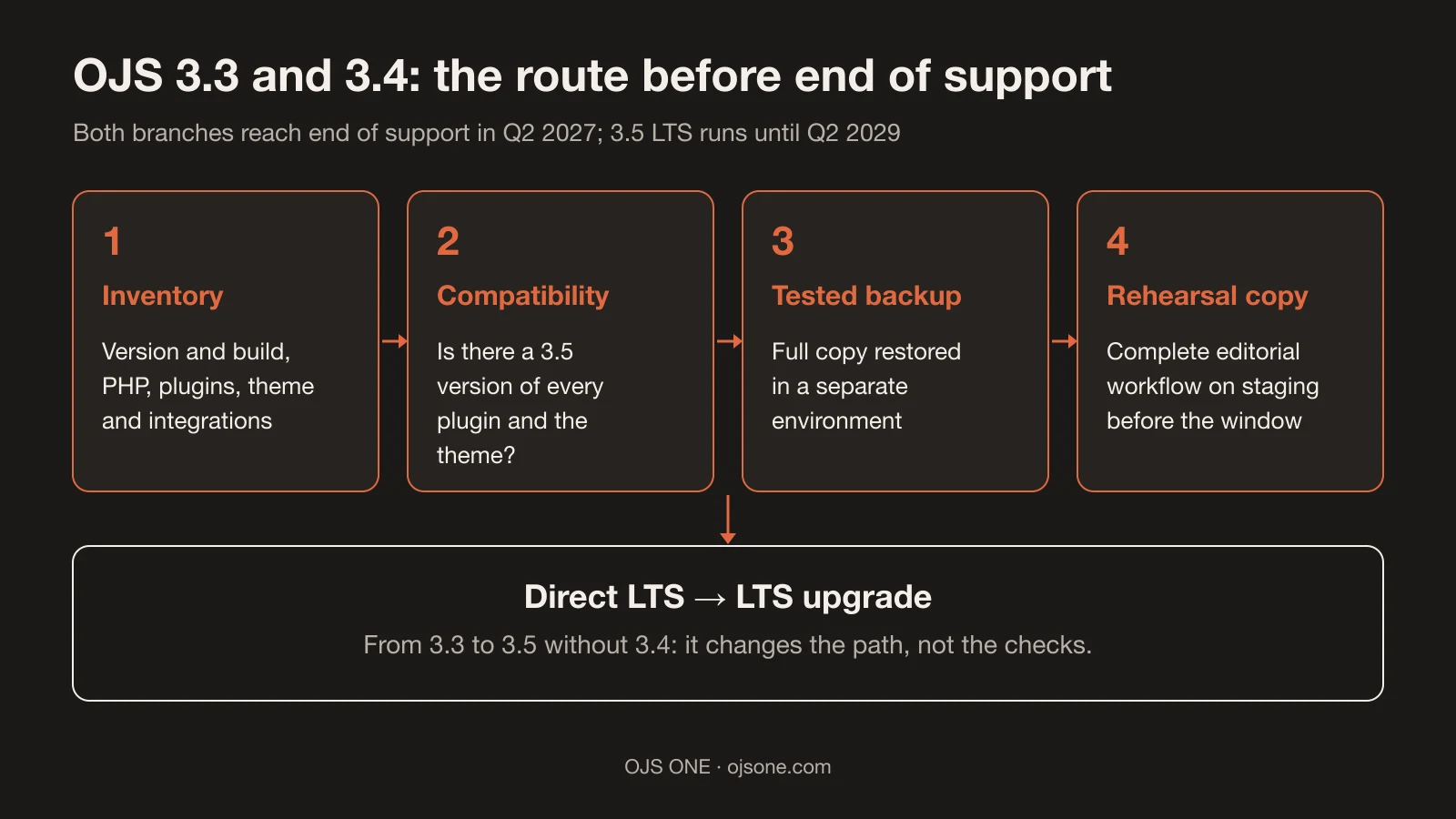
Order matters because each step feeds the next: without an inventory you cannot assess compatibility, and without a tested backup the rehearsal copy is worthless as evidence. As a priority criterion, first what uncovers risk (inventory and compatibility) and then what consumes hours (the maintenance window).
If your journal decides to use the remaining support, this is the minimum sequence:
- Inventory: exact OJS version and build, PHP and database; active plugins with their versions; visual theme and customizations; DOI, OAI-PMH and email integrations.
- Target compatibility: for each plugin and the theme, is there a version for 3.5? Note those that do not and decide whether to replace them, wait for them or adapt the process.
- Full backup and restore test: software, configuration, private files, public files and database, restored in a separate environment.
- Rehearsal copy: upgrade on staging first, with submissions and deposits disabled, and go through the full editorial workflow.
- Acceptance list: access for readers, authors, reviewers and editors; a test submission; publication of an article; email with test recipients; DOI and OAI-PMH without real deposits.
- Defined window: who authorizes, when editorial work stops, which backup is kept and which evidence forces a rollback.
Who takes part is also defined beforehand: the journal manager validates that the editorial workflow stays the same, the technical administrator executes and verifies, and leadership approves the maintenance window. If the institution has an external IT area, it is worth putting in writing who verifies each result on the acceptance list. That agreement is what turns the upgrade into a process with recognizable owners, instead of an intervention that depends on a single person and that nobody else can repeat.
Our guide to upgrading to 3.5 LTS details each stage with click paths and rollback warnings; this article does not replace it, it summarizes the scheduling decision.
Common mistakes when approaching end of support
- Waiting for the last quarter. Upgrades scheduled in the same month as EOL compete for the same technician and the same window as those of every other journal on the branch.
- Confusing "supported branch" with "updated installation". Being on 3.3 does not prove you have build 3.3.0-24 with its fixes2.
- Upgrading without an inventory. The jump from 3.3 to 3.5 requires reviewing the changes documented for 3.4 and 3.5; skipping them moves the surprise to publication day.
- Leaving the theme and plugins for later. If the theme is not ready for 3.5, the upgrade stalls in production.
- Believing end of support switches the software off. It does not switch it off: it leaves it unprotected. The site keeps working, but without patches, without assistance and with an ecosystem that stops looking at that branch.
- Postponing the decision out of fear of change and forgetting the opposite risk: a journal that receives submissions and hosts manuscripts under review on an unpatched branch is also making a decision, only without a record or a date.
- Defining the rollback on the day of the intervention. If the cancellation criterion is not written down beforehand, it does not exist when it is needed.
- Not testing email. The most frequent failure after an upgrade is editorial email that stops arriving; a test with real mailboxes before opening the platform saves the scare.
Frequently asked questions
Will our journal on OJS 3.3 stop working in 2027?
No. The software keeps working after EOL; what is cut off is support: patches, forum assistance and documentation updates1. The accumulated risk, over time, is security and compatibility with the ecosystem.
Can we go directly from OJS 3.3 to 3.5?
Yes. PKP allows it: "You will be able to upgrade directly from LTS to LTS without having to go to the version in between"1. That does not remove the inventory or the rehearsal copy: the direct jump changes the path, not the checks.
How long does an OJS upgrade take?
It depends on the inventory: an installation with compatible plugins and theme is a bounded project; one with broken dependencies or deep customizations requires a prior diagnosis. The timeline is responsibly defined after reviewing the installation, not before.
If your journal runs on 3.3 or 3.4 and you want to organize the transition before end of support, at OJS ONE we operate and upgrade OJS portals with a scope defined per installation, tested backups and editorial support after the change. The implementation checklist and the guide to upgrading to 3.5 LTS are the starting point for preparing the inventory.
Sources
- PKP Software Releases. https://pkp.sfu.ca/software/releases/ (accessed 16 November 2026).
- Download and Install OJS. https://pkp.sfu.ca/software/ojs/download/ (accessed 16 November 2026).
- Memo: Keeping your OJS Installation Secure. https://pkp.sfu.ca/2025/10/15/keep-your-ojs-installation-secure-with-updates/ (accessed 16 November 2026).
OJS ONE · managed operation
Your OJS, operated end to end
Hosting, upgrades with tested backups, editorial email that arrives, monitoring and support with defined response times. Your team edits; we run the platform.
- Upgrades and migrations without improvising
- Tested backups and monitoring
- Support with defined response times
OJS ONE · managed operation
Your OJS, operated end to end
Hosting, upgrades with tested backups, editorial email that arrives, monitoring and support with defined response times. Your team edits; we run the platform.
See plans