Validating JATS XML is not one task but three: the JATS standard checks that the document uses the common format; SciELO's SPS requires the collection's profile and style; PMC assesses completeness and preservation for its archive. A file can pass one layer and fail the next, and none of the three guarantees acceptance by an index.
This piece answers the question that comes up when a validation report comes back: what exactly each tool is checking, what none of them can prove and how to prepare a single article for several destinations. We cover content errors in JATS XML: errors a valid XML can still contain.
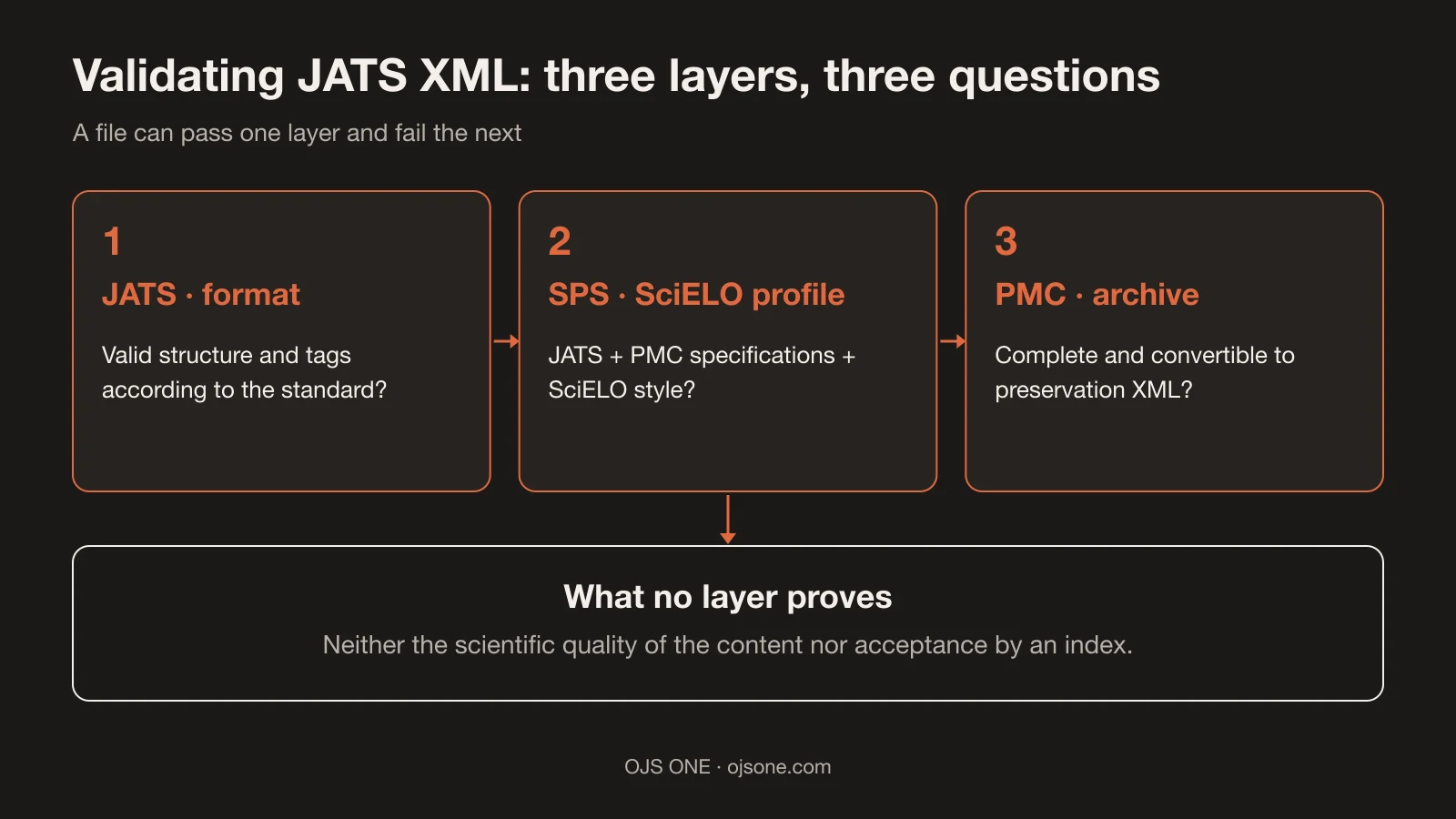
Three layers, three different questions
Direct answer: each layer answers a different question, and confusing them is the most common cause of false reassurance.
- JATS (format layer): is the document well formed according to the standard? JATS "provides a common XML format in which publishers and archives can exchange journal content"1 and offers "a set of XML elements and attributes for describing the textual and graphical content of journal articles"1. It is the lowest layer: structure and tags.
- SciELO's SPS (profile layer): does the document meet the profile SciELO requires in order to receive it? "O arquivo XML que o SciELO necessita deve estar em conformidade com o SciELO Publishing Schema (SciELO PS)"2 (the XML file SciELO needs must comply with the SciELO Publishing Schema), and that documentation is made up of "DTD JATS 1.0 + especificações PMC + Estilo SciELO"2: standard, specializations and the collection's style rules.
- PMC (archive layer): does the content enter the NLM repository complete and preservable? In PMC, submissions "are reviewed for completeness"3 and "the submitted files are converted to archival XML to ensure the long-term preservation of the content"3, in "NISO Z39.96-2015 JATS XML and txt"3 formats.
The practical consequence: "passes JATS" does not mean "passes SPS", and "passes SPS" says nothing about PMC's review process.
How to validate JATS XML according to the destination
Direct answer: first you define the destination, then you choose the tool for that layer and then you record the report.
- Define destination and profile: SciELO (and which SPS version your collection requires), PMC, another repository or none with its own profile? Without that information, any validation is a snapshot without context.
- Format layer: validate the document against the schema of the corresponding tag set (well formed first, schema second). This layer detects misplaced elements, invalid attributes and broken structure.
- SciELO profile layer: for SPS ≥ 1.10 there is the official validator published by SciELO ("spsvalidator SPS >= 1.10"4). For earlier profiles, use the tools SciELO's documentation indicates for your version.
- Content layer: go through the document against the collection's editorial rules: authorship, affiliations, abstracts in two languages, keywords, references and consistency with the published PDF and HTML.
- Record the result: keep the validation report with the date and the tool version. SciELO says it explicitly: "a validação deverá ser feita a cada envio"2 (validation must be done on every submission); a validation passed last month does not cover today's submission.
If your journal delivers to several destinations, the reverse order saves rework: prepare the article against the strictest layer first (the destination profile), and the lower layers fall into place.
How to prepare an article for several destinations
Direct answer: with a single rigorous preparation of the content and one validation pass per destination, not a different file per index.
- Structure from the start: sections with real headings, tables as tables, figures with captions and references in a single ordered block. A document like that produces a clean format layer with no substantive corrections1.
- Complete metadata before tagging: authorship with affiliation, abstract, keywords and identifiers declared in the source. What SciELO asks for is in its profile2; if your destination also wants DOIs or ROR, they are resolved before generating the XML, not afterwards.
- Profiles in parallel, not in series: if you deliver to SciELO and PMC, run the SPS validation and PMC's completeness review on the same article in the same round of corrections3. Correcting twice, weeks apart, multiplies the work.
- One version, three outputs: the published PDF and HTML must tell the same story as the XML. If the abstract differs between formats, no validation detects it: that is editorial review.
What to look at in the validation report
Direct answer: three things: what failed, with which tool and version, and what was deliberately left pending.
- Errors versus warnings: an error blocks submission; a warning calls for judgement. Note which ones you accepted and why, so that the next review does not reopen decisions already taken.
- Run identification: tool, version and date (for SPS ≥ 1.10, "spsvalidator SPS >= 1.10"4 is the name that should appear in the record). Without that identification, the report is not evidence of anything.
- Declared pending items: if a field was left incomplete because of a limitation of the input, write it down with an owner and a date. Silence there becomes a published error.
That report, kept with the issue, is what turns "we already validated it" into a verifiable statement.
What none of the validators can prove
Direct answer: none of the three validates the scientific quality of the content or decides indexing.
- A structurally valid document can still contain data and content errors: that is why separating technical validation from editorial review is not optional (developed in the piece on editorial control errors).
- Validation does not replace a reading review: a valid table can still be unreadable on mobile.
- No tool guarantees acceptance: the assessment by SciELO, DOAJ or any index is decided by each institution with its own criteria.
- Our hands-on test illustrates the point with real output: the XML generated by OJS 3.6.0.0 passed the well-formedness check and failed against SPS (we checked it in the OJS 3.6 test).
Common mistakes when validating
- Validating once and considering the file closed forever; the standard and the profile are checked on every submission2.
- Believing that "valid XML" means "ready for SciELO": they are different layers, as we saw above.
- Validating against the wrong profile: an SPS of another version does not prove compliance with the one your collection requires.
- Fixing structural errors without looking at the content: you fix the lower layer and leave the editorial error published.
- Not keeping the report: without evidence, the next correction starts from scratch and nobody knows what was checked.
- Delegating validation to the same person who does the layout, without a second look: whoever produces the file is less likely to see their own error.
- Correcting blindly: changing tags until the tool goes quiet, without understanding the rule the document was breaking.
- Ignoring warnings because "they do not block": many are the prelude to a published content error.
- Mixing profiles from different collections: SciELO's SPS and another collection's rules are not interchangeable; validate against the one your destination requires2.
- Believing yesterday's pass covers today's submission: validation is run on every submission2.
Frequently asked questions
Does passing JATS validation mean SciELO accepts my article?
No. SciELO requires compliance with its profile (the SPS2) and also applies its editorial processes; a tool does not decide for the collection. Validating your file, with the correct profile, is still required on every submission2.
Which tool do I use for SPS 1.10?
The official validator published by SciELO for that version: "spsvalidator SPS >= 1.10"4. For earlier versions, confirm in SciELO's documentation which ones apply to your collection before correcting anything.
What if my journal delivers to PMC and SciELO at the same time?
Prepare the article against the stricter profile of the two and run the layers in order: format, each destination's profile, content. The extra effort is in the first preparation; afterwards, each submission repeats checks, it does not rebuild the file.
Conclusion. Knowing what each layer checks turns a vague rejection into a concrete list of corrections. With Jatson we produce and validate JATS XML by destination from the accepted article, with the report for each review; if you want us to look at the state of your current files, let's talk.
Sources
- NISO. ANSI/NISO Z39.96-2024, JATS: Journal Article Tag Suite, version 1.4. https://www.niso.org/publications/z3996-2024-jats (accessed 18 November 2026).
- SciELO. Perguntas Frequentes Sobre a Adoção de XML. https://docs.scielo.org/projects/scielo-pc-programs/en/latest/faq-scielo-xml.html (accessed 18 November 2026).
- PMC/NLM. Author Manuscripts in PMC. https://pmc.ncbi.nlm.nih.gov/about/authorms/ (accessed 18 November 2026).
- SciELO. spsvalidator repository. https://github.com/scieloorg/spsvalidator (accessed 18 November 2026).
Jatson · editorial production
From the accepted Word file to validated PDF, HTML and JATS XML
Jatson produces all three formats from the accepted article and delivers the validation report for every submission. Your team stops tagging by hand.
- XML compliant with SciELO's SPS
- HTML ready to read on the article page
- Ready to load into OJS
Jatson · editorial production
From the accepted Word file to validated PDF, HTML and JATS XML
Jatson produces all three formats from the accepted article and delivers the validation report for every submission. Your team stops tagging by hand.
Discover Jatson