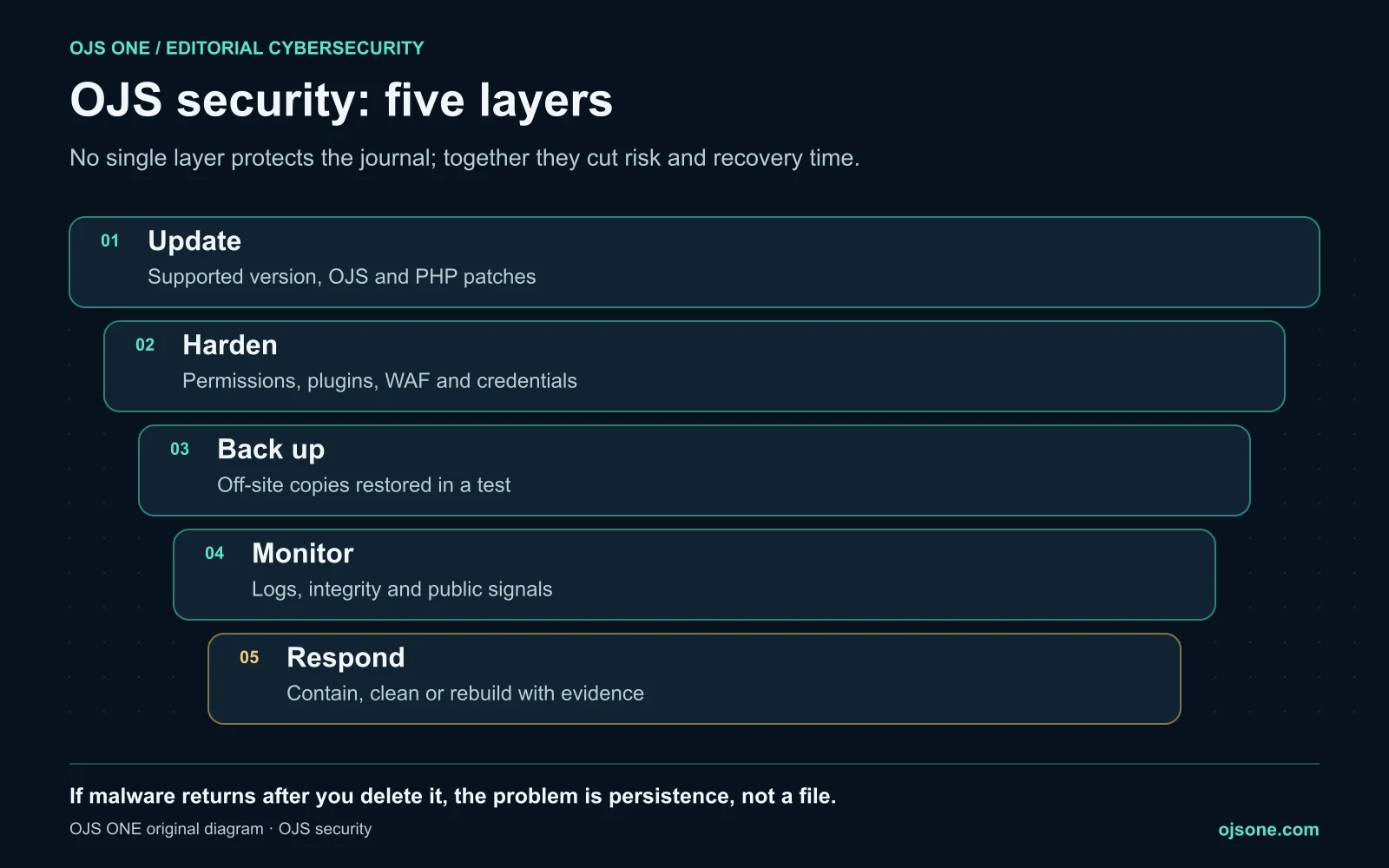
Protecting OJS takes five layers working together: keep a supported version with OJS and PHP patches up to date, harden the server, permissions and plugins, keep off-server backups that have been restored in a test, monitor logs and public signs of compromise, and know how to respond without destroying the evidence. In the cases we have documented, the problem was rarely a sophisticated attack: it was an outdated installation, a plugin or a superficial clean-up that left persistence behind.
This guide brings together everything we have published on OJS security. Each layer links to a deeper analysis or a real case.
Why attackers target OJS journals
A university journal rarely holds data that is valuable in itself. What attackers want is the server and its reputation: an academic domain is useful for publishing SEO spam, showing Google different content than people see (cloaking), hosting attack tools or using the server as a foothold. The report on malicious PHP components in OJS shows how these pieces combine in a real compromise.
For the journal, the result is concrete: spam in Google results under its domain, browser warnings, lost trust from indexers and weeks of work to regain control.
Layer 1: update OJS and PHP
PKP releases bug fixes and security patches for supported versions, which today are 3.3, 3.4 and 3.5.1 Its advice is to keep up: if you are on OJS 3.5, update to the latest maintenance release.2
Two points that are often forgotten:
- PHP gets patched too. A PHP flaw affects OJS even when OJS is up to date. We saw it with PHP2Shell: what to ask your host and how to verify the patch.
- Being on a supported version is not the same as having the patches. You have to check the maintenance release installed. How to decide from the journal's leadership is in updating OJS: the editor's decision on a patch, and a recent case in the OJS subscriptions vulnerability.
If your journal is still on an old version, read what's new in OJS 3.5 and who should upgrade.
Layer 2: harden the server, permissions and plugins
- Plugins: remove the ones you don't use and distrust the ones you don't recognize. In plugin abuse and hidden webshells we show how a plugin became the way in.
- Permissions and roles: every account with the minimum role it needs, no shared admin accounts. PKP stresses strong passwords.2
- Files: the private files directory outside web reach and no unnecessary write permissions on the code.
- Perimeter: a WAF and traffic limits slow down the scans and bots that overload journals; see AI bots on OJS: how to review journal overload.
The full technical checklist is in off-site backup and OJS security: hardening, WAF and a production checklist.
Layer 3: backups you can actually restore
A backup is useful if it lives outside the compromised server, includes the database, private files and configuration, and has been restored at least once in a test. If the only backup sits on the same server, an incident or ransomware takes it along with the journal.
Layer 4: monitor logs and public signals
Many compromises leave traces long before anyone notices: scans, SQL injection attempts, requests to files that shouldn't exist. How to read those signals is in how to detect SQLi, scans and early signs of compromise, and the OJSTI threat reports document full cases.
For a first check from the outside, the free OJS compromise scan looks for SEO spam, hidden links, suspicious redirects and cloaking on your journal.
Layer 5: respond without destroying the evidence
When something shows up, the most common mistake is deleting the file and closing the case. If malware comes back after you delete it, the problem is persistence, not a file: we saw it in the case of the defunct-kernel malware on OJS, which reinstalled itself from outside the website.
An orderly response contains, preserves evidence, cleans or rebuilds, rotates credentials and validates before going back into production. We detail it in OJS hardening after an incident and, from the journal leadership's side, in OJS intrusion: decisions to recover a journal.
Signs your OJS may already be compromised
- Google shows spam pages (casinos, pharmacy, loans) under the journal's domain.
- The journal looks normal to you, but visitors from Google are redirected elsewhere.
- PHP files nobody recognizes appear in
tools/,locale/,templates/,plugins/or API paths. - There are plugins or admin accounts nobody installed or created.
- Malicious folders or files reappear after being deleted.
- The server sends email or uses resources without explanation.
If you recognize any of these, don't reinstall blindly: preserve the evidence and ask for a full review.
OJS security checklist
- OJS on a supported version and its latest maintenance release.
- Supported, patched PHP, verified in the process that runs the journal.
- Plugins and theme reviewed; no abandoned plugins.
- Accounts with the minimum role needed and strong passwords.
- Private files directory outside web reach.
- WAF or traffic filtering in place.
- Off-site backups restored in a recent test.
- Logs reviewed on a defined schedule.
- A named owner and a written incident procedure.
- Subscription to PKP's security announcements.2
Who should own it
OJS security fails when nobody owns it: the editor thinks it's the host's job and the host thinks OJS is the journal's business. OJS ONE's cybersecurity team for OJS audits the installation, applies OJS and PHP patches with evidence, hunts for webshells and persistence, and responds if an incident has already happened. If you'd rather have one team own the whole platform, the managed OJS plans include upgrades, tested backups and monitoring.
Frequently asked questions
Is OJS secure?
OJS receives security patches while its version is supported, but a journal's security depends mostly on how it is run: an up-to-date version, patched PHP, reviewed plugins, tested backups and someone watching.
How do I know if my OJS has been hacked?
The most common signs are spam under your domain in Google, redirects for visitors coming from search engines, unknown PHP files and malware that keeps coming back. OJS ONE's free compromise scan checks the public signals; an audit reviews the whole server.
Is deleting the malicious files enough?
No. If there is persistence, for example in system scripts or outside the web directory, the malware comes back. You need to find the mechanism, rotate credentials and decide whether to clean or rebuild.
How often should I update OJS?
Every time PKP publishes a maintenance release or security patch for your branch, after testing it on a copy. PKP publishes security announcements worth subscribing to.
What should I do if my journal shows spam in Google?
Treat it as a compromise: preserve evidence, review the whole server, remove the cause and the persistence, and only then ask Google to review the affected pages.
Sources
- PKP, Software Releases. https://pkp.sfu.ca/software/releases/ (accessed 20 November 2026).
- PKP, Keeping your OJS installation secure. https://pkp.sfu.ca/2025/10/15/keep-your-ojs-installation-secure-with-updates/ (accessed 20 November 2026).
Cybersecurity for OJS
Is your OJS patched and free of prior compromise?
We audit the installation, apply OJS and PHP patches with evidence, hunt for webshells and persistence, and respond if an incident has already happened.
- OJS-specific audit and hardening
- Patches with a tested restore
- Incident response
Cybersecurity for OJS
Is your OJS patched and free of prior compromise?
We audit the installation, apply OJS and PHP patches with evidence, hunt for webshells and persistence, and respond if an incident has already happened.
Review my OJS