Implementing OJS at a university is not just installing software: it is leaving a journal, or a journal portal, operating with its editorial workflow, its metadata and its archive safe. Price and timeline are not set by the technical installation: they are set by the migration and by whatever editorial decisions are still pending.
This guide separates what you contract, tells installing apart from migrating, explains what drives the timeline and what makes the project more expensive, and gives you criteria for comparing proposals in writing. It does not promise dates or amounts that depend on each scope.
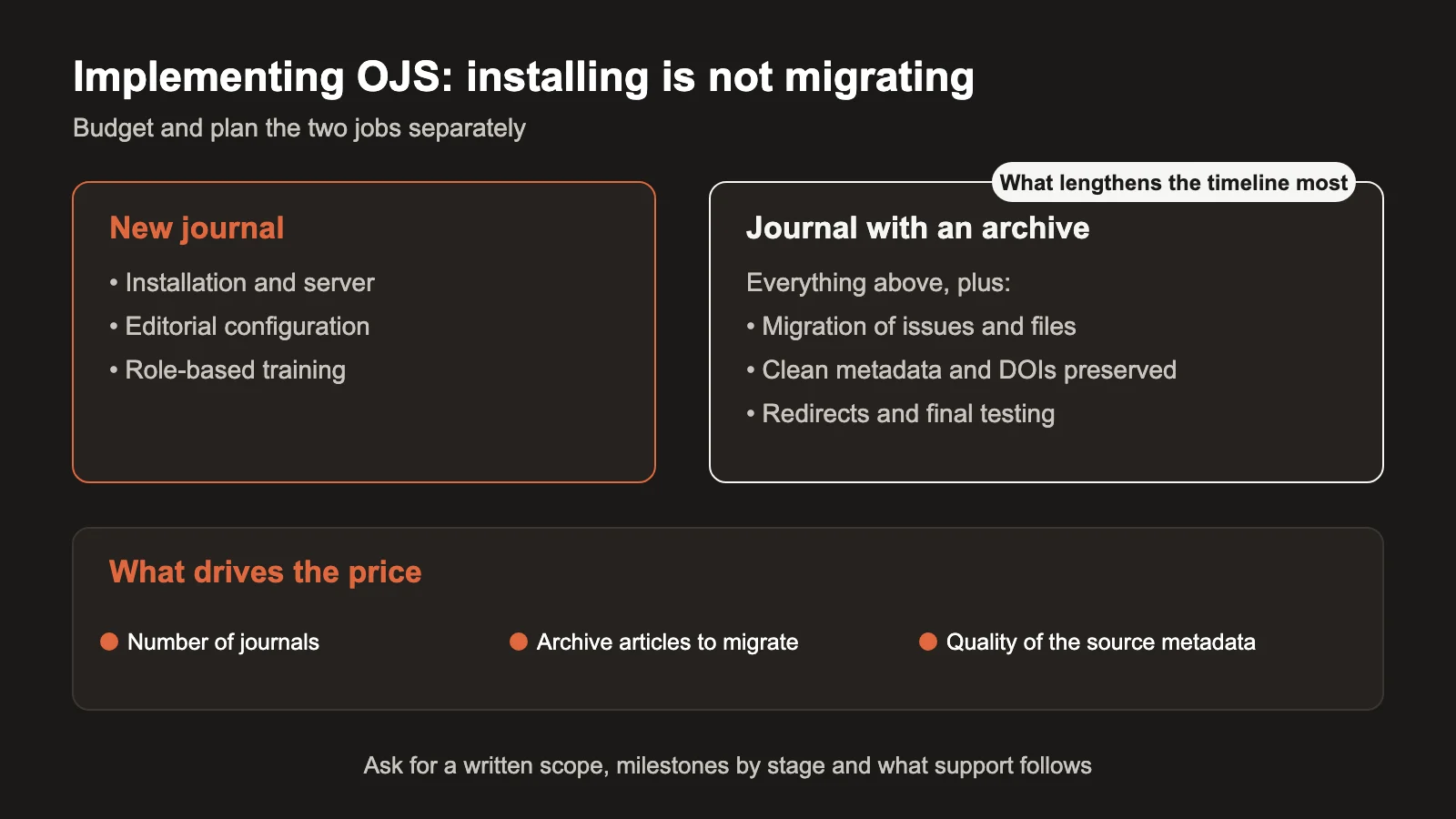
Implementing OJS: what a project really includes
OJS is free software: it is distributed under the GPL license and has no license fee per journal, article or user.2 The cost of a project lies in the work —implementing, running the infrastructure and sustaining support— not in the tool.2 Understanding this avoids the first budget surprise: you are not buying software, you are contracting work.
A complete project usually includes:
- Server installation and configuration: PHP, database, HTTPS, transactional email.
- Journal configuration: editorial workflows, roles, sections, policies, email templates and appearance.
- Metadata and interoperability: DOI, ORCID, OAI-PMH and exports depending on the destination.
- Archive migration, if the journal already published on another platform or version.
- Role-based training: editors, reviewers, authors and administration.
- Support and updates, when continuous operation is contracted.
PKP describes OJS as able to run one or several journals per installation,1 which is convenient if the university wants a portal with its portfolio rather than one installation per title. Before asking for a quote, define how many journals are included, what state each one is in and who will administer the portal. Those answers organize the rest of the project.
If your journal does not exist yet and you only want to publish its first issue, start with the implementation checklist before launching, which covers the start-up and not this contracting process.
Installing is not migrating: separate the two jobs
This is where the biggest budget surprises appear. Installing means setting up a new OJS and configuring a journal that starts from zero. Migrating means bringing articles, issues, users and submission history from another platform or version without losing them: PKP describes that whole set as the normal scope of a content migration.3
They are different jobs, and the proposal should list them separately:
- A new journal almost only requires installation, editorial configuration and training.
- A journal with an archive adds migration: metadata, DOI already cited, redirects if URLs change and tests showing that every article is still accessible.
There is a constraint that appears early. PKP requires structured metadata —title, abstract, authors— in CSV or XML format to migrate from another platform with automated tools; if the archive does not carry that data, manual import is what remains in OJS.3 In practice: a messy archive makes the migration more expensive from day one, not only later when it gets fixed.
DOI that are already registered must be kept. If the domain changes, the destination is updated in Crossref and permanent redirects are left in place so links published in other articles keep working. The migration guide to 3.5 LTS explains that route in stages.
Practical rule: if your journal already has published issues, you are buying two projects in one. Budget them separately and ask for different milestones for each.
How long it takes: what drives the timeline
There is no standard timeline. PKP recommends estimating it before promising anything: a test upgrade in a sandbox environment, with a copy of the database and the files, gives an indication of how long the real process will take.4 That test is also the moment to see whether the current installation needs adjustments.
PKP adds another fact that buyers tend to underestimate: in these migrations the changes are usually more about human resources —training and design— than technical.4 In other words, the calendar stretches because of people, not only servers.
What drives the timeline:
- The size of the archive: more articles to migrate, more testing.
- The quality of the source metadata: without structure, migration turns into manual import.3
- Pending editorial decisions: policies, sections, committees and design that are not yet defined slow things down more than the installation does.
- Validations: DOI, OAI-PMH, links and preservation are checked before declaring the work closed.
A good plan defines milestones per stage —tested migration, a publication window with a full backup beforehand, support afterwards4— instead of a single date with no declared dependencies. That way, if an editorial decision slips, you can see how the rest moves before you are in closing week.
What drives the price of an implementation
The price is built by scope: the license does not charge.2 The factors that move it, in the usual order of impact, are:
- Number of journals. A portal with several titles shares an installation, but multiplies configuration and training per journal.1
- Archive size. Migration covers articles, issues, users and submission history, and that volume defines the work.3
- Quality of the source metadata. Without structured metadata there is no automated import.3
- JATS XML production or other special formats, which is an editorial service distinct from the implementation.
- Visual customization beyond the standard themes.
- Continuous operation afterwards, contracted separately by plan. In OJS ONE, the published plans, with their scope and price, are on the plans page.
Be wary of a single price with no written scope. The value is not in the bare number but in what is included, what is billed separately and who answers afterwards. A clear proposal should answer in writing:
- Which journals and how many articles are within scope?
- What is migrated and what is left out?
- What tests are run before closing?
- What support and updates follow after the project?
- What is charged separately if unplanned work appears?
Your own infrastructure or managed editorial infrastructure
PKP documents deployments ranging from shared servers to VPS and cloud.2 The choice is not about where the software lives, but about who sustains the operation.
- Your own infrastructure. Full control, but your IT team takes on updates, backups, security and performance.
- Managed editorial infrastructure. A single party operates the server, the updates, the security and the editorial production. That reduces handoffs between stages.
Before deciding, ask each proposal to state in writing who responds when something fails between one stage and the next. At OJS ONE that integration is the starting point: platform, operation and editorial production sit within a single team, instead of being split among external IT, a server provider, typesetting and a separate XML specialist.
Common mistakes when contracting the implementation
- Confusing installation with the complete project. An installation with no migration, training or workflow configuration leaves the journal halfway.
- Not declaring the migration scope. Without it, every old article you want to recover is billed separately.
- Quoting without having reviewed the archive. The structure of the metadata decides whether the import is automated or manual.3
- Forgetting training. Without role-based training, the editorial team cannot run the workflow even though the system is installed.
- Assuming that migrating leaves everything intact. DOI, URLs and cited links require testing and, at times, redirects.
- Asking for a standard timeline without your own data. The real timeline depends on the archive and on editorial decisions; a sandbox test estimates it.4
- Choosing on price without seeing what comes after. Support and updates keep the journal alive after the project.
Frequently asked questions
Does OJS have a license cost?
No. It is free software under the GPL license, with no cost per journal, article or user.2 The costs are in implementing, running the infrastructure and providing support.
Can I have several journals in a single installation?
Yes. Each OJS installation can run one or several journals, with independent teams, policies and appearance per title.1 That is what makes an institutional portal practical.
How much does my case cost and how long does it take?
There is no standard price or timeline that lets us answer with a figure. The project is quoted by scope —journals, volume and state of the archive, source metadata and extra services such as JATS XML— and the operation is contracted by plan. The timeline is set by the migration and by editorial decisions, and it can be estimated with a prior test.4 The safe route is a diagnosis with scope and a staged budget.
Conclusion. Implementing OJS well means separating installation from migration, declaring the scope and planning the timeline in stages. If you want a proposal with scope, timelines and prices in writing for your university, write to us; if you prefer to start with a diagnosis, the OJS 360 Assessment reviews the state of your journal before you decide.
Sources
- Public Knowledge Project. Open Journal Systems (OJS). https://pkp.sfu.ca/ojs/ (accessed November 9, 2026).
- Public Knowledge Project. Download and Install OJS. https://pkp.sfu.ca/software/ojs/download/ (accessed November 9, 2026).
- Public Knowledge Project. Migrating Your Content. https://pkp.sfu.ca/hosting-services/other-services/migration/ (accessed November 10, 2026).
- Public Knowledge Project. 5 Steps to OJS 3: Upgrade Planning for Service Providers. https://pkp.sfu.ca/2018/07/11/5-steps-to-ojs-3-upgrade-planning-for-service-providers/ (accessed November 10, 2026).
OJS ONE · managed operation
Your OJS, operated end to end
Hosting, upgrades with tested backups, editorial email that arrives, monitoring and support with defined response times. Your team edits; we run the platform.
- Upgrades and migrations without improvising
- Tested backups and monitoring
- Support with defined response times
OJS ONE · managed operation
Your OJS, operated end to end
Hosting, upgrades with tested backups, editorial email that arrives, monitoring and support with defined response times. Your team edits; we run the platform.
See plans