
User Manual: Reviewer in OJS 3.4
Practical guide for reviewers in OJS 3.4: accept or decline invitations, download the manuscript, complete the evaluation and finish the review.
This manual explains the reviewer's workflow in OJS 3.4. Its goal is to guide peer review from the reviewer's account, from receiving the invitation to delivering the final report.
Review in OJS 3.4 is usually organized in four steps that are visible to the reviewer:
- Request
- Guidelines
- Download and Review
- Completion
Each screenshot is presented within the corresponding step to give context to the explanation.
1. What does the reviewer do in OJS?
The reviewer is the person invited by the journal to give an academic judgment on a manuscript. In OJS 3.4, that work can include:
- accepting or declining a review invitation;
- reading editorial guidelines;
- downloading the assigned manuscript;
- analyzing quality, originality, method, arguments and bibliography;
- completing a review form;
- writing comments for the editor and for the author;
- selecting an editorial recommendation;
- formally finishing the review.
The reviewer guides the editorial decision but does not replace it. The final decision always belongs to the journal's editor.
2. Step 1: Review request
When opening the link received by email or the OJS user dashboard, the reviewer will see a screen titled Review: [article title].
At this first stage, OJS shows the 1. Request tab.
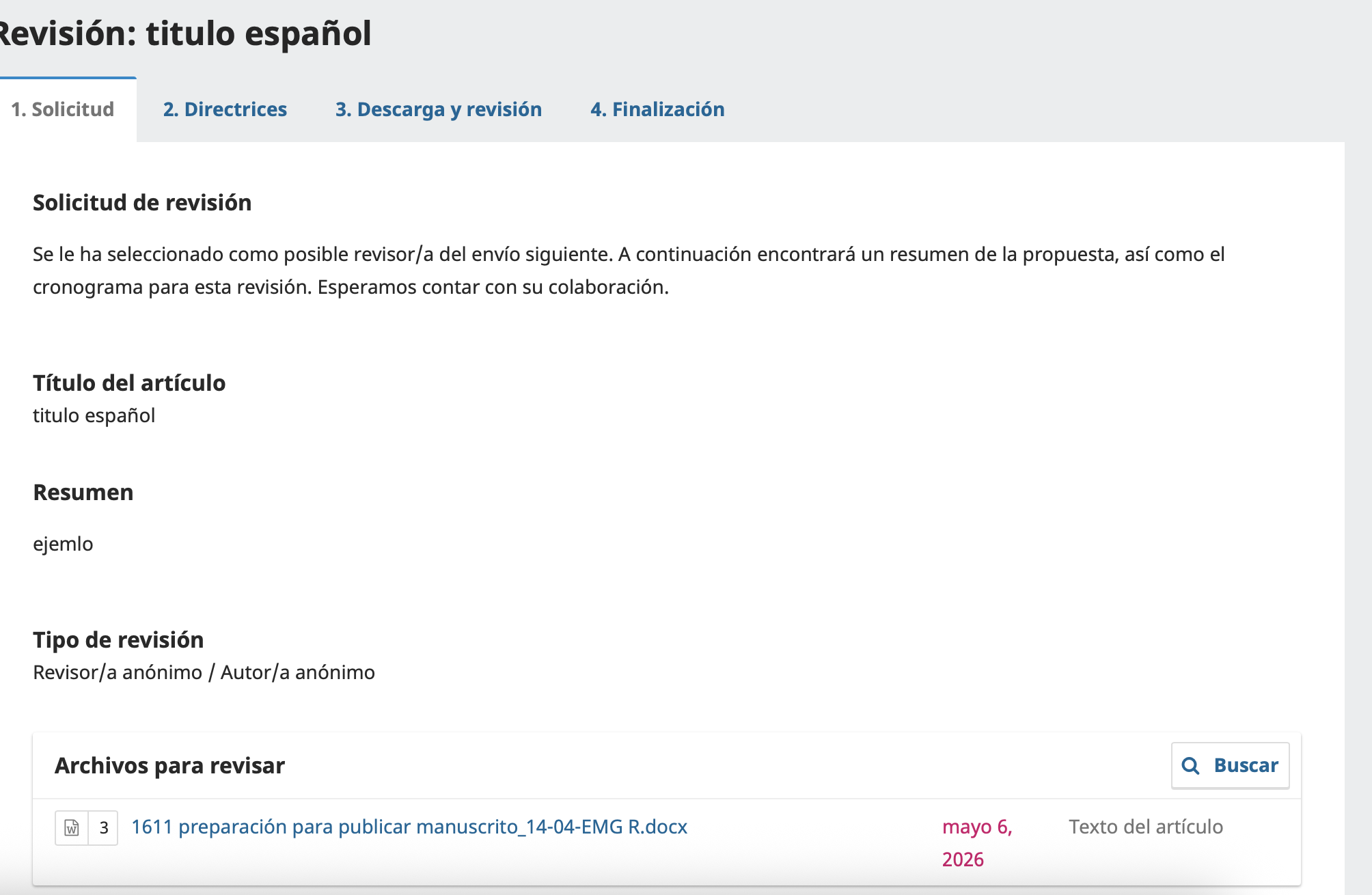
This screen presents elements such as:
- article title;
- manuscript abstract, if it was entered in OJS;
- type of review;
- files available for review;
- deadlines or dates, if the journal configured them;
- options to accept or decline the request.
What to check before accepting
Before committing to the review, the reviewer should confirm:
- That the manuscript's topic falls within their area of expertise.
- That there is no conflict of interest with authors, institutions or results.
- That they can meet the deadline requested by the journal.
- That the manuscript can be evaluated impartially.
When it is better to decline the invitation
It is advisable to decline the review when:
- the topic is outside your specialty;
- there is a conflict of interest;
- you will not be able to meet the deadline;
- the manuscript requires expertise very different from your own.
Declining in time is better than accepting and not completing the evaluation.
3. Step 2: Reviewer guidelines
After responding to the request, the reviewer must move on to the 2. Guidelines tab.
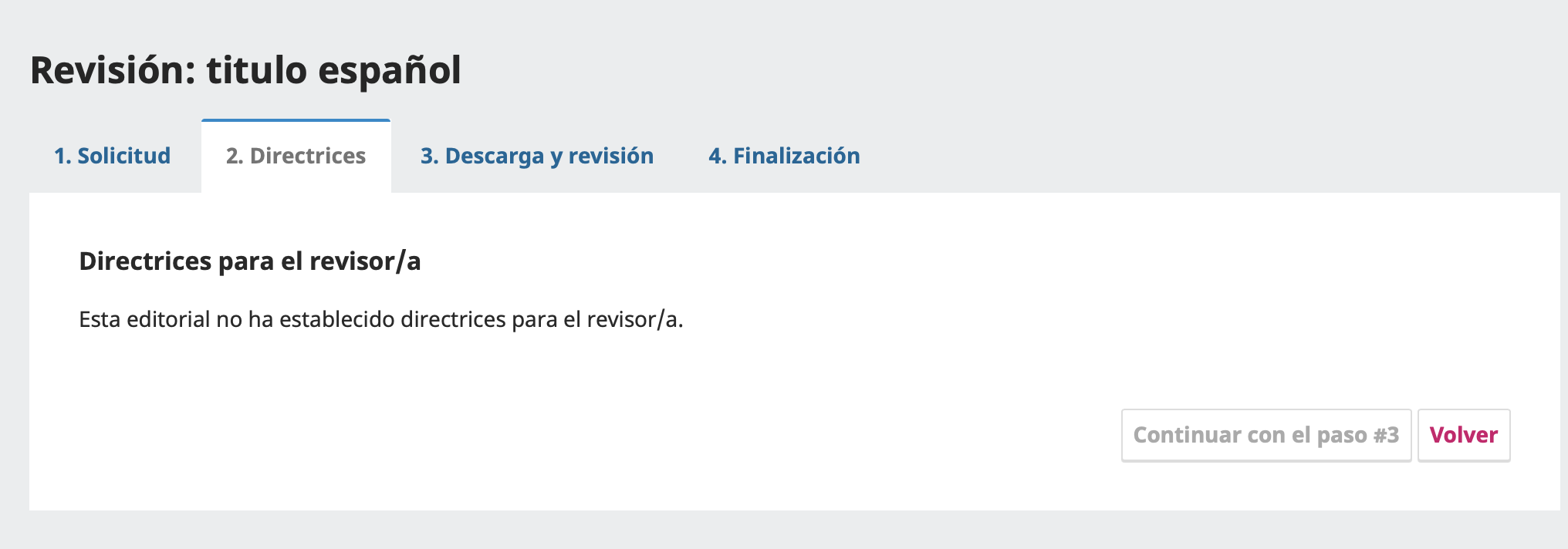
In this section, the journal can display specific instructions for reviewers, for example:
- evaluation criteria;
- confidentiality policy;
- expected format of the report;
- the methodological or editorial approach the journal favors;
- instructions about attachments and comments.
In some journals a message equivalent to the following may appear:
This publisher has not established guidelines for the reviewer.
If that happens, the reviewer should apply general academic criteria and, when possible, check the journal's public policies on its website.
Expected action at this step
At this stage you should:
- Read the guidelines, if any.
- Confirm that you understand the type of review requested.
- Move on to the next step with the continue button.
If the system does not let you continue, a previous action may be missing, such as formally accepting the review.
4. Step 3: Download and review the manuscript
The 3. Download and Review tab is the core of the reviewer's work.
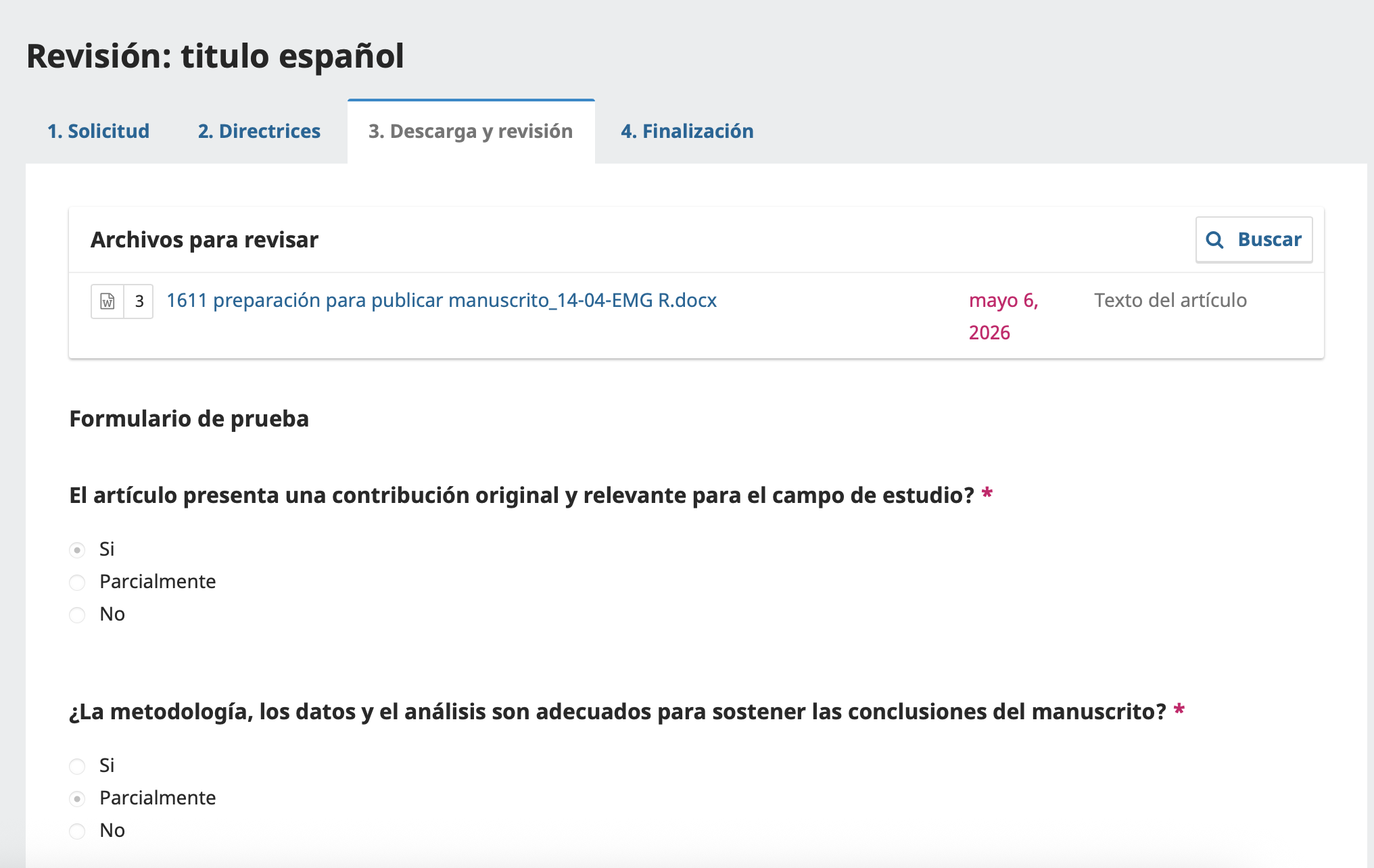
The Files for Review are shown here. For the purposes of this manual, it can be understood as a main file such as:
manuscrito_articulo.docx
That file normally corresponds to the text of the article to be evaluated.
How to download the manuscript
To download the file:
- Locate the Files for Review section.
- Click the file name.
- Download the document to your computer.
- Review it in Word, LibreOffice or another compatible tool.
What the reviewer should examine in the file
While reading the manuscript it is worth analyzing:
- originality and relevance of the work;
- clarity of the research problem;
- appropriateness of the theoretical framework;
- quality of the methodology;
- soundness of the data or sources;
- coherence between results, discussion and conclusions;
- currency and quality of the bibliography;
- writing, structure and overall presentation;
- compliance with ethical criteria.
Attention to double-blind review
If the journal uses blind or double-blind review, the reviewer should not receive a document that clearly reveals the authorship.
If, when downloading the file, you notice author names, affiliations, identifiable acknowledgments or other obvious clues to authorship, the correct thing is to tell the editor before continuing, because that can affect the impartiality of the evaluation.
The reviewer should not try to fix that editorial problem on their own; they should leave a record for the team responsible for the journal.
5. Complete the review form
In the same 3. Download and Review tab, OJS may show a form configured by the journal.
Required questions are usually marked with a red asterisk *. Depending on the site's configuration, the form may include closed questions, scales or comment fields.
Examples of frequent evaluation focuses:
- originality of the article;
- relevance to the field;
- methodological quality;
- validity of the analysis;
- clarity of the argumentation;
- appropriateness of results and conclusions.
How to answer the form well
The reviewer must answer consistently with the real content of the manuscript. A useful review is not limited to ticking options; it must be backed by clear arguments.
The answers should:
- be consistent with each other;
- reflect specific strengths and weaknesses;
- distinguish major problems from minor ones;
- help the editor understand the quality of the work;
- guide the author on how to improve the manuscript.
Comments to the author and to the editor
If OJS enables separate comments, it is important to distinguish their purpose:
- Comments for the author: should be clear, respectful and aimed at improving the article.
- Comments for the editor: may include confidential remarks that should not be sent to the author, for example ethical doubts, a serious methodological conflict or suspected plagiarism.
Avoid using the comments to the author to include personal disqualifications or imprecise judgments.
6. Select an editorial recommendation
After reviewing the manuscript and completing the form, OJS may ask the reviewer to select a recommendation.
The following image shows in detail the block of recommendations available to the reviewer within OJS 3.4.
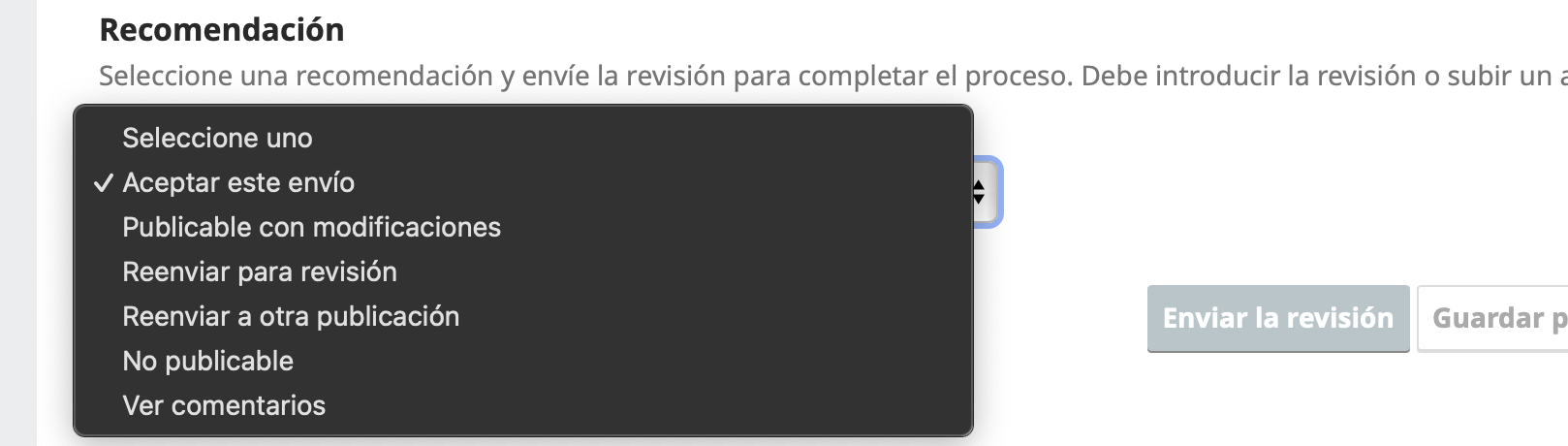
The exact options depend on each journal, but they usually include variants such as:
- Accept Submission
- Revisions Required
- Resubmit for Review
- Decline Submission
- See Comments
The visible list may vary according to each journal's editorial configuration. That is why the reviewer should check carefully which alternatives the system offers before finishing the review.
How to choose the recommendation
The final recommendation must be consistent with the report delivered.
For example:
- if the manuscript needs few adjustments, the recommendation may be favorable with modifications;
- if there are substantive but correctable flaws, it may be appropriate to request revisions;
- if the problems are structural or the work does not meet the journal's standard, a negative recommendation may be appropriate.
It is not good practice to select a positive recommendation if the comments describe serious unresolved problems.
7. Before submitting the review
Before finishing, the reviewer must carefully check that:
- all required questions are answered;
- the comments are technically grounded;
- the language used is respectful;
- the final recommendation matches the content of the report;
- no data revealing their identity is included, if the review is anonymous;
- any attached file is free of comments or metadata that unnecessarily expose the reviewer.
If a Word file with comments or tracked changes was used, it is worth checking the document properties, user name and metadata before uploading it.
8. Step 4: Completing the review
Once the evaluation has been submitted, OJS shows the 4. Completion tab.
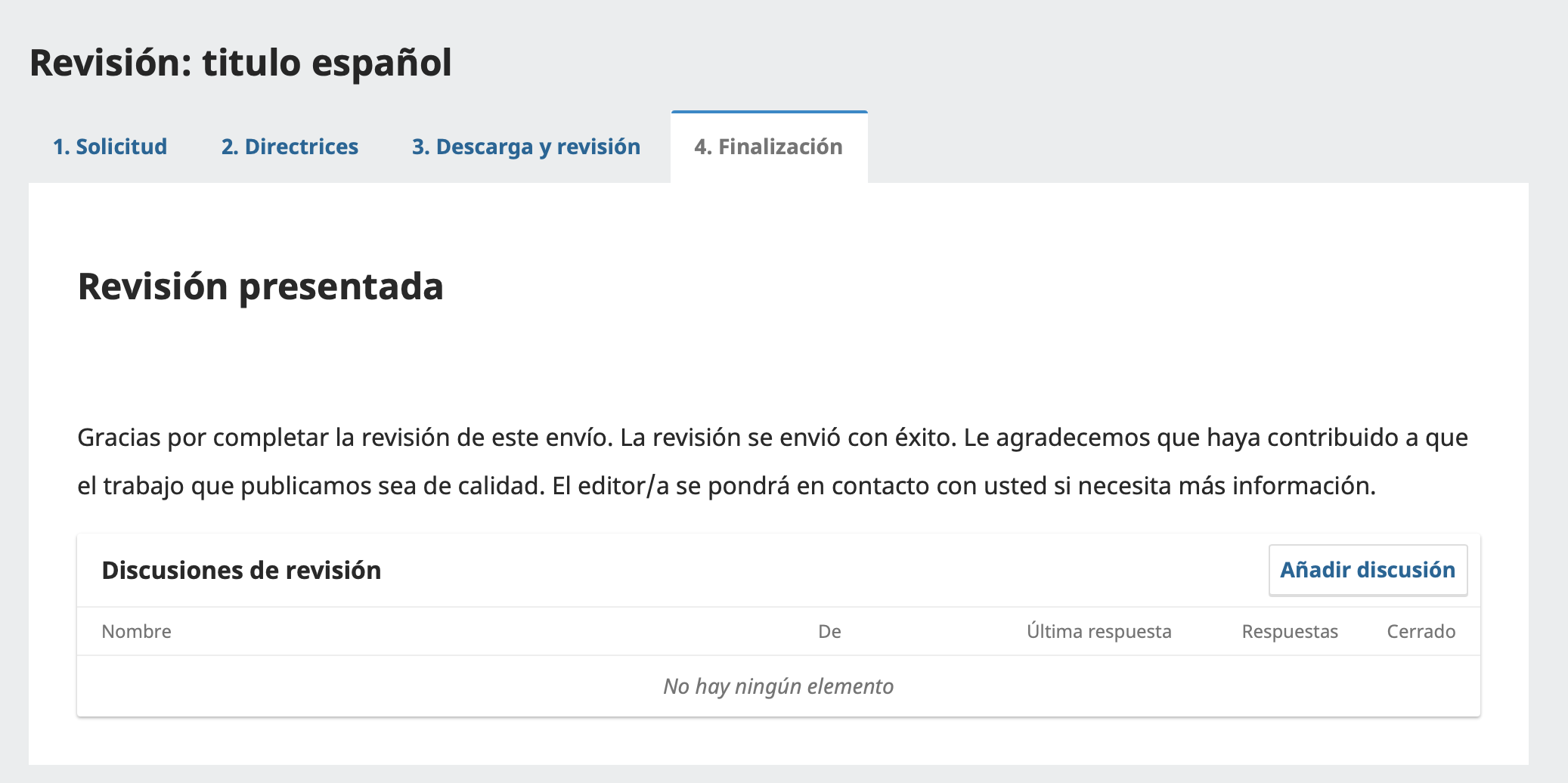
This screen shows the message Review submitted, confirming that the evaluation was recorded correctly.
A thank-you message from the system may also be displayed, indicating that the review was submitted successfully and that the editor will get in touch if additional information is needed.
Review discussions
At this stage a Review Discussions section may also appear.
That area is for additional clarifications with the editor, for example if:
- the editor needs a clarification about the report;
- an observation needs to be supplemented;
- there was a technical problem with files or comments.
9. Best practices for reviewers in OJS
Confidentiality
The manuscript received for review must be treated as a confidential document. It must not be shared with third parties or used for purposes other than the editorial evaluation.
Impartiality
The evaluation must be based on the academic quality of the manuscript, not on personal preferences about authors, institutions or theoretical approaches.
Anonymous review
If the journal uses anonymous or double-blind review, the reviewer should avoid including their name, affiliation or personal data in comments or attached files.
Quality of the report
A good evaluation report should be:
- specific: it points out concrete problems;
- well-grounded: it explains why an observation is relevant;
- constructive: it guides possible improvements;
- coherent: it aligns comments and final recommendation;
- respectful: it avoids offensive or disqualifying language.
Use of attachments
If a revised file is uploaded, it is worth checking its metadata beforehand. In Word documents, user names, internal comments or data about the computer used may remain visible.
10. Reviewer checklist
| Check | Status | Notes |
|---|---|---|
| The invitation was reviewed before accepting it | Pending | |
| Absence of conflict of interest was verified | Pending | |
| The review deadlines were confirmed | Pending | |
| The editorial guidelines were read | Pending | |
| The correct manuscript was downloaded | Pending | |
| It was checked whether the file reveals authorship in a blind process | Pending | |
| The required form was completed | Pending | |
| The comments to the author are clear and useful | Pending | |
| The final recommendation matches the report | Pending | |
| It was verified that attached files do not reveal the reviewer's identity | Pending | |
| The review-submitted message was confirmed | Pending |
11. Frequent problems
I cannot move on to the next step
You may need to formally accept the request, complete a previous action or answer a required field.
The button to submit the review does not appear
Check whether the form has unanswered questions. Required fields are usually marked with a red asterisk *.
I cannot download the file
Check your connection, try another browser or report the problem to the responsible editor.
The form shows no questions
The journal may not have configured a review form. In that case, the report may be required in comment fields or through an attached file.
I already submitted the review, but I need to correct something
You must contact the responsible editor. Once submitted, the review may be closed to direct editing from the reviewer's account.
The manuscript reveals who the author is
If the process is blind or double-blind and the authorship is visible, you must report that situation to the editor before continuing with the review.
12. Expected result
At the end of this workflow, the journal should have received a complete and usable evaluation for the editorial decision.
A useful review helps the editor answer at least these three questions:
- Does the manuscript contribute something relevant to the field?
- Does it meet sufficient methodological, argumentative and ethical standards?
- What editorial decision is justified according to the evidence provided by the reviewer?
The value of the review lies not only in the final recommendation but in the quality, clarity and usefulness of the analysis delivered.
Is your journal struggling with slow performance or recurrent outages?
Contact our team and see how enterprise-grade infrastructure can transform your editorial operation.
Request assessment