
SEO for OJS Journals: How to Improve Visibility in Google Scholar and DOAJ
SEO strategies for OJS with OAI-PMH, Google Search Console, metadata, JSON-LD and indexing in Google Scholar and academic databases.
In today's digital age, most readers reach academic content through internet searches. Improving the visibility and discoverability of your scientific journal not only increases the reach of your publications but also attracts a wider and more diverse audience. Implementing effective strategies to optimize the online presence of your Open Journal Systems (OJS) is essential to make sure your content reaches the right audience at the right time.
Enable the OAI-PMH protocol
OJS exposes article metadata through OAI-PMH, which is a metadata harvesting protocol. Thanks to OAI-PMH, harvesting systems can automatically collect article-level metadata from journals running on OJS at regular intervals, through direct machine-to-machine communication.
To enable the protocol, you need to configure the OAI module in OJS: OAI module configuration.
Once that is done, check that the module is configured correctly using one of the following validators:
If the journal's website passes validation, you can register your journal(s) so that several open access content aggregators index it, such as:
Some aggregators have specific requirements that must be met for the content to be collected, for example OpenAIRE. You can also register your journal's website as a data provider with the Open Archives Initiative.
Index your journal with search engines
One of the main ways internet search engines find and index websites is through meta tags. Meta tags are fragments of HTML found on your web page that are not visible to users, but are visible to search engines and the bots they use to crawl content on the web. OJS lets you fill in relevant metadata for your journal to help describe its content better for improved searchability.
If you are a journal manager, you can go to:
Distribution > Search Indexing
You can complete the description and keyword information that gives your site the important metadata search engines crawl. Be as thorough as you can. There is also a Custom Tags field that can be used for special-use terms that may be unique to your journal.
<!-- Custom meta tags for SEO -->
<meta name="description" content="Academic journal specialized in high-quality scientific research.">
<meta name="keywords" content="academic journal, scientific articles, research, Open Journal Systems">
<meta name="author" content="Your Journal">

<!-- Open Graph meta tags for social networks -->
<meta property="og:title" content="Academic Journal">
<meta property="og:description" content="Explore the latest published scientific research.">
<meta property="og:type" content="website">
<meta property="og:url" content="https://yourjournal.com">
<meta property="og:image" content="https://yourjournal.com/path/to/image.jpg">
Tips for using Google Search Console
Setting up a Google Search Console account will let you register your site for indexing and submit your XML sitemap. OJS has a built-in sitemap. This is the usual path to the sitemap:
https://journal_domain/index.php/journal/sitemap
Google Search Console is an essential tool for academic journal editors who want to improve the visibility of their publications. This platform lets you measure the exposure of the journal's OJS site, providing valuable data about the search terms researchers use, the countries readers come from and the journal's most visited pages. By analyzing this information, editors can adjust and improve their SEO and digital marketing strategies, making sure their academic articles reach a global audience more effectively and efficiently.
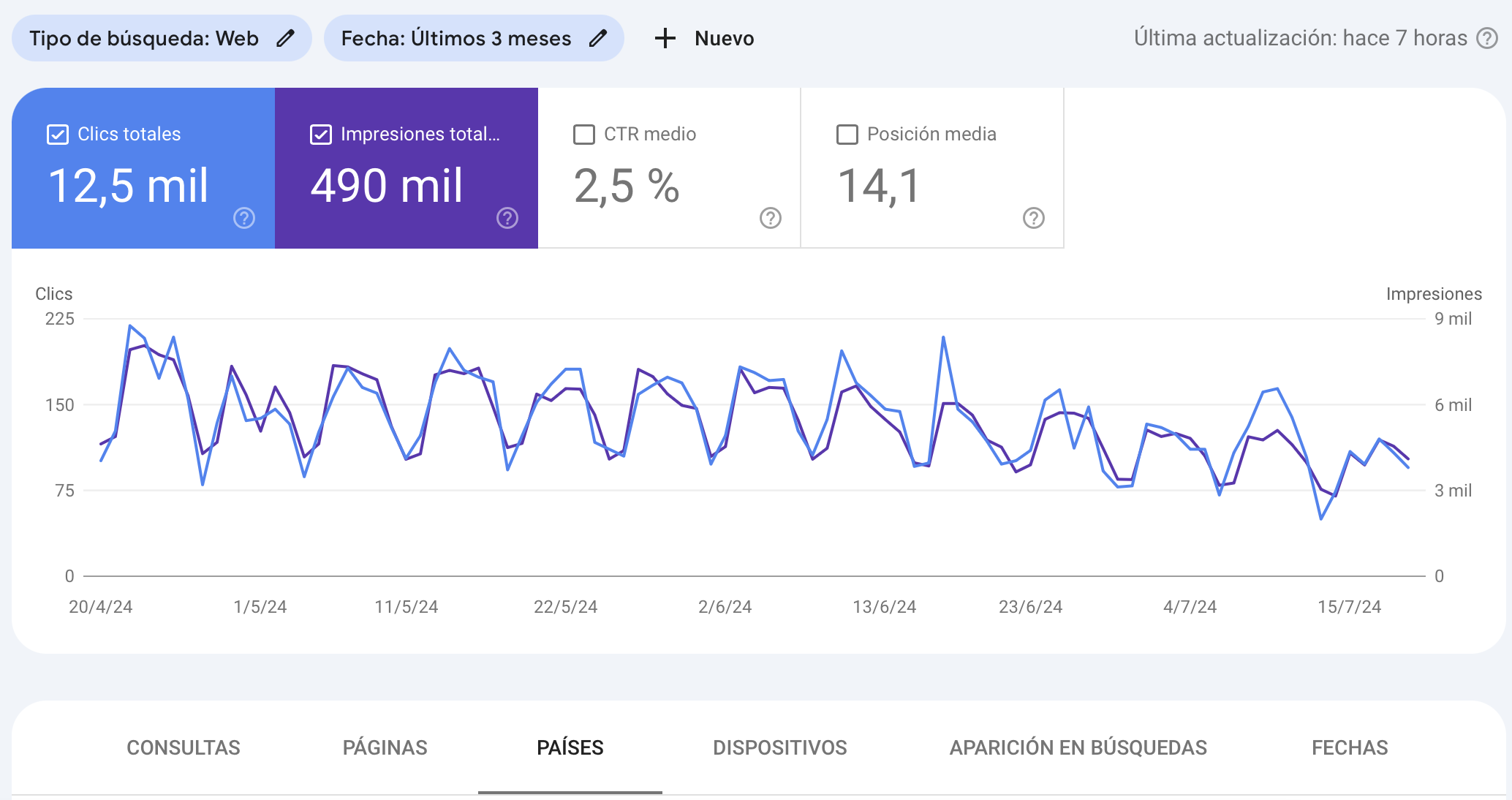
Note: setting up Google Search Console will require a Google account. In addition, if you use Google Analytics to collect OJS usage statistics, the two services can be used together.
Tips for indexing with Google Scholar
You do not need to register your site to be indexed. Scholar's crawler will find the site automatically. The standard OJS URL structure has worked well for a long time.
Standard URL example: https://www.revistabosque.org/index.php/bosque/article/view/1592
Avoid customizing URLs, which makes it harder to identify a journal site and, as a result, takes longer to index.
For indexing, Google Scholar needs URLs for all articles and bibliographic information in the form of machine-readable metadata tags ("meta tags"). You can find more information about meta tags in the Google Scholar inclusion guidelines.
Meta tag example
<meta name="citation_title" content="The testis isoform of the phosphorylase kinase catalytic subunit (PhK-T) plays a critical role in regulation of glycogen mobilization in developing lung">
<meta name="citation_author" content="Liu, Li">
<meta name="citation_author" content="Rannels, Stephen R.">
<meta name="citation_publication_date" content="1996/05/17">
<meta name="citation_journal_title" content="Journal of Biological Chemistry">
<meta name="citation_volume" content="271">
<meta name="citation_issue" content="20">
<meta name="citation_firstpage" content="11761">
<meta name="citation_lastpage" content="11766">
<meta name="citation_pdf_url" content="http://www.example.com/content/271/20/11761.full.pdf">
In OJS, you can view meta tags in the source code from the article's landing page by right-clicking or using the keyboard command for "View page source", depending on your browser, and searching the HTML source for "citation" to see the meta tags.
Important: the meta tags must match the published PDF — for example, the title, author and publication dates match the bibliographic meta tags written (only) in the language of the published full-text article. Do not duplicate the meta tag information in multiple languages.
Create keywords for the article
OJS provides some tools that let authors and journal editors create keywords for the articles that are published. This feature needs to be enabled so that the submission form can include the keyword description during the metadata description.
Embed Dublin Core metadata in PDF files
Most users who retrieve journal content using internet search engines will land directly on PDF files. They will probably download a PDF and save it for later use. If a PDF is not supplied with embedded metadata that can be automatically picked up by reference management tools, users may be unwilling to return to the journal's website to check the license information or the version of the document.
That is why it is useful to supply PDFs with embedded metadata according to the XMP (Extensible Metadata Platform) standard. This can be done easily with the help of the reference management software JabRef.
Publish in HTML format with JSON-LD metadata
Publishing academic articles in HTML format offers several essential advantages:
- Responsive reading on any mobile device, letting readers access the content comfortably and efficiently from their phones and tablets
- Better SEO on Google thanks to the implementation of metadata in JSON-LD format, which significantly improves visibility and the semantics of the data
- Greater indexing — search engines can identify and classify the articles correctly, positioning them better in search results
- Improved accessibility that widens the reach of the research, increasing its impact
Academic journals that publish only in PDF lose visibility and valuable opportunities to attract more readers and increase their citations.
Register with DOAJ
DOAJ is an online directory that indexes and provides access to open access peer-reviewed journals. It includes more than 13,750 journals covering all areas of science, technology, medicine, social sciences and humanities.
The content of journals indexed in DOAJ is automatically indexed by other content aggregators (for example, Dimensions.ai, EBSCO Discovery Service, OpenAIRE).
The DOAJ journal application form is available here: DOAJ Application Form
Before you start:
- Read the DOAJ information for publishers
- Review your website
- Make sure your journal meets all the criteria
Important note: it is not possible to save your progress in the online application form, so DOAJ recommends that you gather the information you need before you start filling in the form.
Once you are registered, use a DOAJ plugin in OJS to keep the metadata in sync.
Conclusion
Improving the visibility of your academic journal with OJS requires a comprehensive approach that combines correct technical configuration, well-structured metadata and registration in the appropriate databases and directories. By implementing these strategies, your journal will be better positioned to reach a global audience of researchers and increase the impact of its publications.
If you need professional help to optimize the visibility of your OJS journal, do not hesitate to contact us.
Is your journal struggling with slow performance or recurrent outages?
Contact our team and see how enterprise-grade infrastructure can transform your editorial operation.
Request assessment