
OJS 3.6 Upgrade: Testing the Editorial Workflow
Plan the OJS 3.6 upgrade with an inventory, staging, editorial production tests, training and a rollback plan before any change reaches production.
OJS 3.6 Upgrade: Testing the Editorial Workflow
The OJS 3.6 upgrade requires separating an announcement from a decision to change. PKP presents 3.6 as an upcoming version: its first release is scheduled for autumn 2026, not as a release that is available today.[3] Meanwhile, OJS 3.5 is the current, supported LTS; 3.6 belongs to the planned STS line.[1]
The reasonable decision is not to schedule production because of a presentation. It is to build a reproducible test with a protected copy of the journal, a demanding editorial sample and explicit criteria for moving forward or going back.
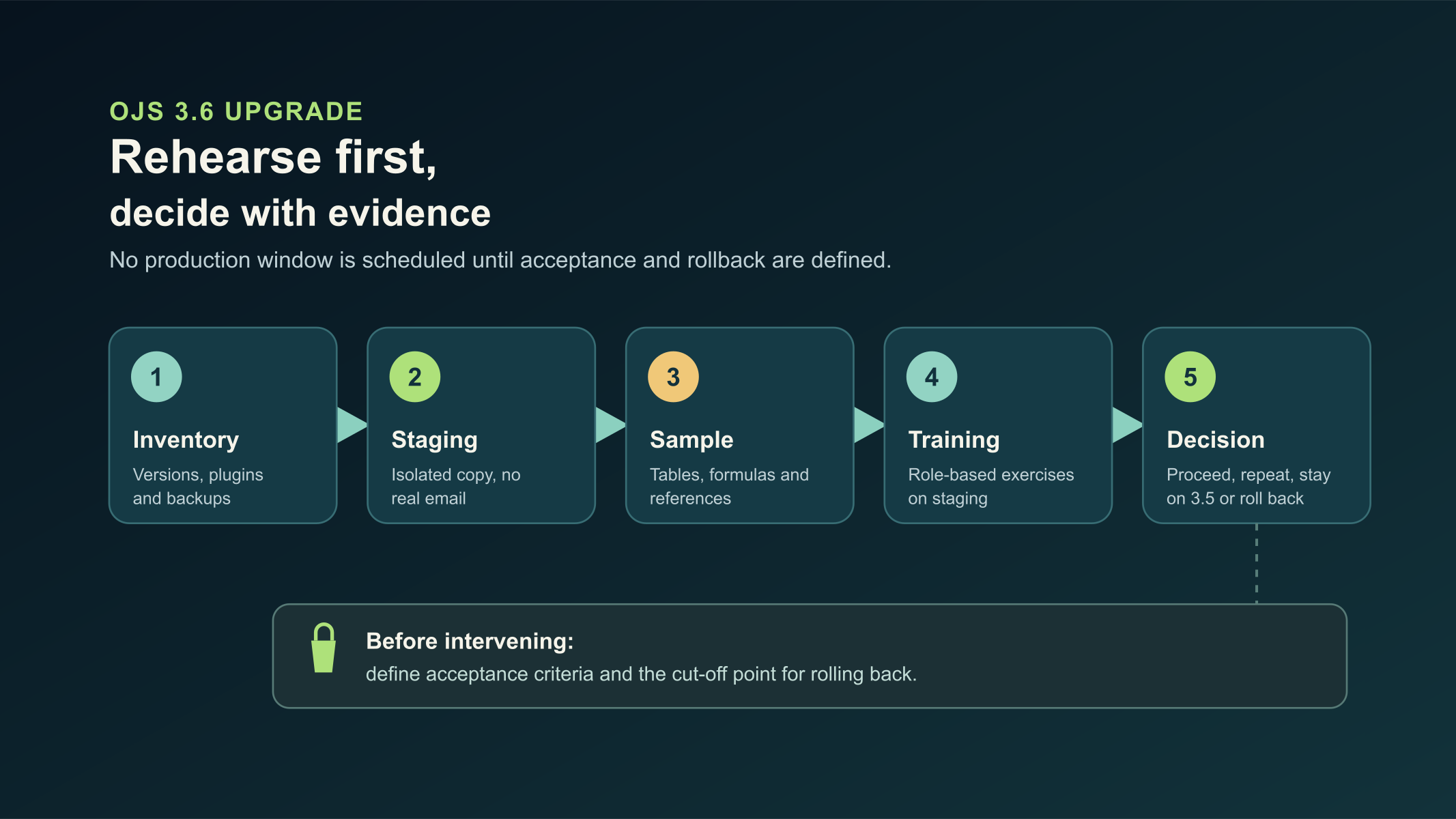
Original diagram. It summarizes the rehearsal sequence before any production window.
OJS 3.6 upgrade: announcement and availability
OJS 3.6 was announced by PKP, but the announcement is not the same as a version released for installation. The statement itself identifies the initial release as scheduled for autumn 2026.[3] Until PKP publishes the version and its release material, it is unwise to turn the announcement into a committed production date.
PKP's releases page marks OJS 3.5 as a supported LTS. It also explains that odd-numbered branches, such as 3.5, are LTS, while even-numbered ones, such as 3.6, are STS.[1] For a journal that needs a supported base now, 3.5 remains the current reference. The upgrade path to 3.5 is explained in the OJS ONE migration guide.
What was announced for 3.6 is relevant to editorial production: an integrated HTML editor and generation of HTML, PDF and JATS XML from HTML as the canonical source.[2] PKP also states that the traditional workflow with desktop tools or external services will remain available.[2] That is why a test must compare the integrated path with the process the journal can already run, without assuming the latter disappears.
Build an inventory that lets you decide
The inventory is not an administrative list. It is the basis for reproducing the platform, recognizing dependencies and defining what each role will validate. Do it before creating staging and assign one person to each item.
- Record the exact version of OJS, PHP, database, web server, extensions and scheduled tasks.
- List journals, private and public file paths, space used, configuration, certificates, email and cron.
- Identify active plugins, their editorial function, dependency, maintainer and fallback if they fail.
- Document the theme, CSS, modified templates, code changes and analytics or identity components.
- Map DOI deposits, OAI-PMH, authentication, email, storage and integrations that exchange data.
- Mark which users will validate submission, review, copyediting, production, publication and reading.
- Keep evidence of a recoverable backup of code, configuration, files and database.
The OJS ONE migration guide reminds us that a recovery requires software, configuration, private files, public files and the database.[4] It is not enough to confirm that a compressed file exists. Restore the copy in an isolated instance, open a galley, download a file and check that the editorial relationships are still present. That rehearsal is the useful evidence for a rollback.
Prepare staging, plugins and theme without exposing the journal
Staging must be a separate copy, with restricted access, indexing blocked, controlled outgoing email and external connectors in safe mode. Its purpose is to observe the change without unintended notifications, real deposits or alteration of external data.
Create a simple matrix for plugins and theme. In the first column, write the component and version. Then record function, compatibility evidence when published, rehearsal result, owner and decision: keep, replace, disable or escalate. Apply the same criterion to a child theme, custom CSS and templates. A portal can open its home page and still hide a failure in a form, an automatic task or a galley.
At this stage, do not replace stable processes in anticipation. PKP notes that the integrated editor will be an alternative within the software and that the legacy workflow remains available.[2] Keep the current process during the rehearsal and define the condition that would allow you to try the new alternative after an actual release.
Use a sample that puts pressure on the editorial workflow
A short test with plain text provides little signal. Select a controlled sample that represents the journal's hard cases: an article with a bilingual abstract, authors with identifiers, long reference lists, a table with merged cells, an equation, a figure with a caption, an internal link and a correction at the editorial stage. Use authorized copies or fictional material; do not expose manuscripts or personal data.
PKP anticipates that table and formula layouts are preserved during the transformation, but warns that complex or atypical styles may not transform perfectly.[3] The sample must visibly test that limit. Do not reduce it to a single PDF galley.
For each case, define the expected result and the evidence:
- Submit or upload the test file and confirm that the body is converted to editable HTML if the function is available.
- Review headings, lists, tables, equations, figures, alternative text, links and references.
- Generate HTML, PDF and JATS XML when the function exists, and compare them with the input material and the publication result.
- Correct a reference, a cell and a formula; regenerate the files and verify what gets updated.
- Walk through editorial assignment, review, copyediting, production and publication with test accounts.
- Check the public view, galley downloads, metadata, OAI-PMH, email and tasks that affect that journal.
- Record screenshots, error messages, generated files and a decision for each defect found.
PKP's announcement explains that only the body of the article is shared with the integrated editor and that metadata appears in a sidebar.[2] So validate title, authors, abstract, identifiers and references separately, instead of concluding that converting the body proves the complete record.
Train by task, not by screen
Training must take place on staging and with the same sample used for acceptance. Assign exercises by role: whoever receives manuscripts must upload and detect initial problems; whoever copyedits must edit body and references; production must review the output of each format; whoever administers must observe errors, tasks, permissions and restoration.
Ask each participant to complete one operation and leave evidence: a reviewed galley, a corrected data point, a documented incident or a rehearsed recovery. This approach reveals operational doubts before a change window and keeps the team from learning on real submissions.
Include a short decision guide. It should state when to use the usual path, when to try the integrated function and whom to escalate to if a table, formula or style loses fidelity. The goal is not to force a single procedure: it is to sustain editorial control while the tool changes.
Define acceptance and rollback before intervening
Do not schedule production until you agree on which result allows you to continue and which signal forces you to stop. The acceptance list must include access by role, test files, status of submissions and reviews, public display, email, scheduled tasks, plugins in use, theme, integrations and metadata. Each test needs an owner, evidence and an approval criterion.
Rollback requires a cut-off point. Define when editorial changes are frozen, who authorizes opening or closing the window, which consistent copy will be restored and how actions taken during the final rehearsal will be recorded. If an upgrade alters the database, reverting only the previous code does not recover a consistent platform. The OJS ONE guide recommends recovering a consistent set of code, configuration, files and data.[4]
Close the plan with an explicit decision: continue, repeat the rehearsal, stay on 3.5 LTS or restore the copy. Waiting for an actual 3.6 release is not inaction; it lets you run the test on the software that would really be installed.
Mistakes to avoid
The first mistake is saying that OJS 3.6 has already been released. PKP's source speaks of a scheduled first release, so internal communication should use "announced" or "planned".[3]
The second mistake is testing with an empty journal. Transformations are evaluated with tables, formulas, references and representative styling, especially because PKP identifies possible limits with complex styles.[3]
The third is calling an unrestored copy a backup. Recovery is validated by restoring in a separate instance and checking data and files, not just by seeing that the backup finished.
The fourth mistake is training after the change. Staging lets you practice, collect issues and adjust instructions without affecting real publications or communications.
Frequently asked questions
Is OJS 3.6 already available for production?
No. As of October 23, 2026, PKP's communication places the first 3.6 release in autumn 2026.[3] Check the releases page and the release material before choosing a version to install.
Why keep OJS 3.5 while evaluating 3.6?
Because 3.5 appears as a supported LTS on PKP's releases page.[1] The evaluation of 3.6 can move forward with planning and test design, without replacing a current base with an announced version.
What should the test sample contain?
Include tables, formulas, references, figures, links, corrections and the publication of HTML, PDF and JATS XML when that function is available. That way you can compare the result with the material the journal processes and detect style limits.[3]
Evaluate the upgrade with technical support
If you need to organize inventory, staging, backup, testing and rollback before an upgrade, see the OJS operation service. The scope is defined according to the installation, its editorial workflow and the evidence gathered in the rehearsal.
Sources
- PKP, PKP Software Releases — accessed 2026-10-23.
- PKP, OJS 3.6: Bringing Manuscript Editing and Production under one Roof — accessed 2026-10-23.
- PKP, Upload, Transform, Publish: Inside OJS 3.6’s File Production and Toolset — accessed 2026-10-23.
- OJS ONE, Upgrading OJS to 3.5 LTS: requirements and migration path — accessed 2026-10-23.
Is your journal struggling with slow performance or recurrent outages?
Contact our team and see how enterprise-grade infrastructure can transform your editorial operation.
Request assessment