
How to Customize Reviewer Recommendations in OJS
Learn how to change reviewers' recommendations in OJS and adapt the peer review workflow to your journal's needs.
Open Journal Systems (OJS) is a widely used platform for managing and publishing academic journals. By default, however, OJS does not provide a simple way to change the recommendation options available to reviewers. In this article we explore how to customize those recommendation options so you can adapt the system to the specific needs of your journal. We go step by step through changing the options available to reviewers and modifying the texts associated with each option. This process involves editing some system files, so it is important to proceed with caution and make sure you have a backup before making any change.
Customization Example: Before and After
Below are screenshots of the recommendations menu before and after the customization:
Before the Customization
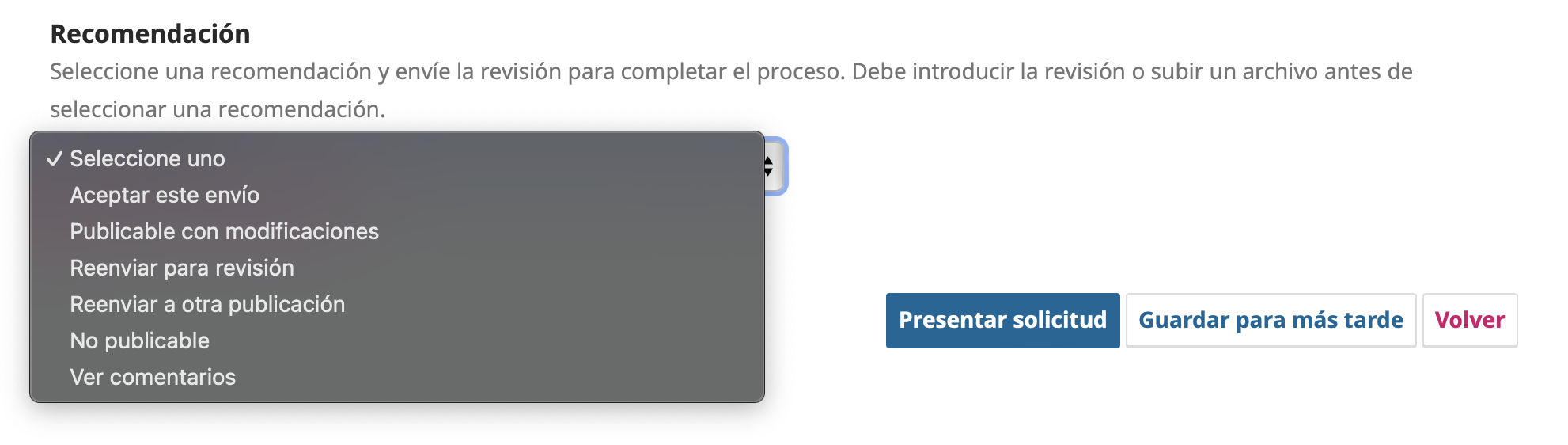
After the Customization
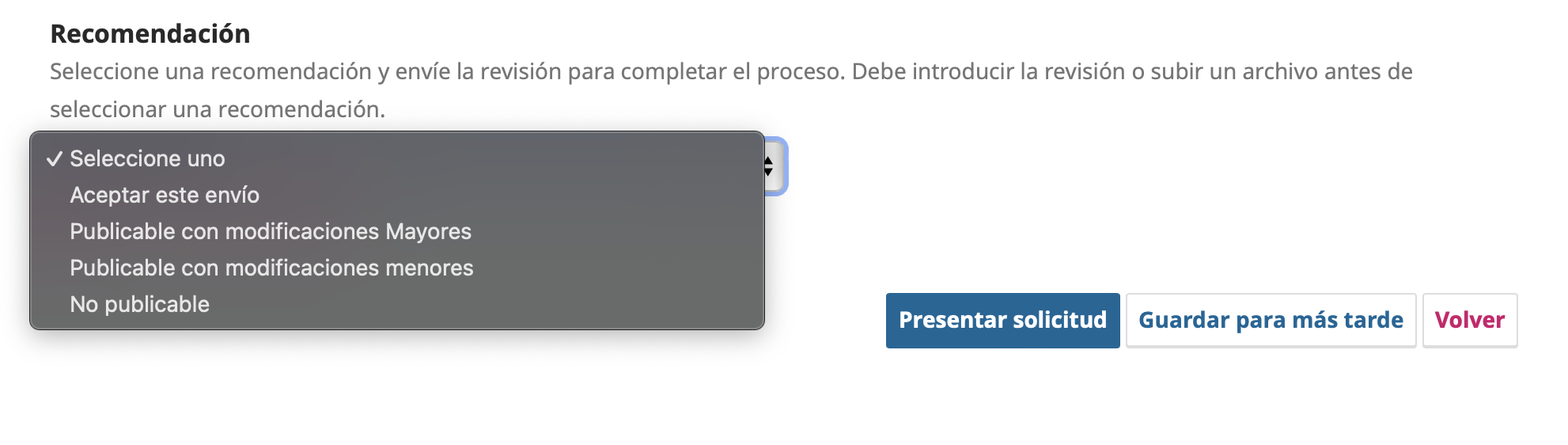
Step 1: Modify the Recommendation Options
To modify the review recommendation options, you need to edit the file ReviewAssignment.inc.php, located at /lib/pkp/submission/reviewAssignment/.
1. Locate the file ReviewAssignment.inc.php
Go to /lib/pkp/submission/reviewAssignment/ and open the file ReviewAssignment.inc.php in a text editor.
2. Find the getReviewerRecommendationOptions method
Look for the following method inside the file:
static function getReviewerRecommendationOptions() {
    static $reviewerRecommendationOptions = array(
        '' => 'common.chooseOne',
        SUBMISSION_REVIEWER_RECOMMENDATION_ACCEPT => 'reviewer.article.decision.accept',
        SUBMISSION_REVIEWER_RECOMMENDATION_PENDING_REVISIONS => 'reviewer.article.decision.pendingRevisions',
        SUBMISSION_REVIEWER_RECOMMENDATION_RESUBMIT_HERE => 'reviewer.article.decision.resubmitHere',
        SUBMISSION_REVIEWER_RECOMMENDATION_RESUBMIT_ELSEWHERE => 'reviewer.article.decision.resubmitElsewhere',
        SUBMISSION_REVIEWER_RECOMMENDATION_DECLINE => 'reviewer.article.decision.decline',
        SUBMISSION_REVIEWER_RECOMMENDATION_SEE_COMMENTS => 'reviewer.article.decision.seeComments'
    );
    return $reviewerRecommendationOptions;
}
3. Remove the unwanted options
In this example, the "See comments" option will be removed. To do so, simply delete the corresponding line:
SUBMISSION_REVIEWER_RECOMMENDATION_SEE_COMMENTS => 'reviewer.article.decision.seeComments',
The modified code will look like this:
static function getReviewerRecommendationOptions() {
    static $reviewerRecommendationOptions = array(
        '' => 'common.chooseOne',
        SUBMISSION_REVIEWER_RECOMMENDATION_ACCEPT => 'reviewer.article.decision.accept',
        SUBMISSION_REVIEWER_RECOMMENDATION_PENDING_REVISIONS => 'reviewer.article.decision.pendingRevisions',
        SUBMISSION_REVIEWER_RECOMMENDATION_RESUBMIT_HERE => 'reviewer.article.decision.resubmitHere',
        SUBMISSION_REVIEWER_RECOMMENDATION_RESUBMIT_ELSEWHERE => 'reviewer.article.decision.resubmitElsewhere',
        SUBMISSION_REVIEWER_RECOMMENDATION_DECLINE => 'reviewer.article.decision.decline'
    );
    return $reviewerRecommendationOptions;
}
Step 2: Modify the Associated Texts
The texts associated with the recommendations are in the localization (locale) files. To change these texts, you need to edit the locale.po files for the language in use. This example shows the changes for Spanish (locale/es_ES).
1. Locate the locale.po files
The localization files are in the locale/es_ES folder for Spanish. Open the locale.po file.
2. Find and edit the text strings
Inside the locale.po file, look for the following text strings and modify them as needed. For example, to change "Publicable con modificaciones" (publishable with modifications) to "Publicable con modificaciones mayores" (publishable with major modifications), look for the string:
msgid "reviewer.article.decision.pendingRevisions"
msgstr "Publicable con modificaciones"
and change it to:
msgid "reviewer.article.decision.pendingRevisions"
msgstr "Publicable con modificaciones mayores"
3. Examples of modified text strings
Here are some examples of text strings that were modified. In English, the values correspond to: accept this submission, publishable with major modifications, publishable with minor modifications, resubmit to another publication and not publishable.
msgid "reviewer.article.decision.accept"
msgstr "Aceptar este envío"

msgid "reviewer.article.decision.pendingRevisions"
msgstr "Publicable con modificaciones mayores"

msgid "reviewer.article.decision.resubmitHere"
msgstr "Publicable con modificaciones menores"

msgid "reviewer.article.decision.resubmitElsewhere"
msgstr "Reenviar a otra publicación"

msgid "reviewer.article.decision.decline"
msgstr "No publicable"
Conclusion
Customizing the review recommendation options in OJS is a simple process that can significantly improve the reviewers' experience. By following the steps detailed above, you can adapt the recommendation options and the associated texts to the specific needs of the journal. This not only improves the clarity of the recommendations but also ensures that review decisions are accurate and useful.
We hope this guide has been useful. If you have any questions or need more information, do not hesitate to contact us or visit the official OJS documentation.
Is your journal struggling with slow performance or recurrent outages?
Contact our team and see how enterprise-grade infrastructure can transform your editorial operation.
Request assessment